10 Europe Map PowerPoint Templates to Improve Your Slides
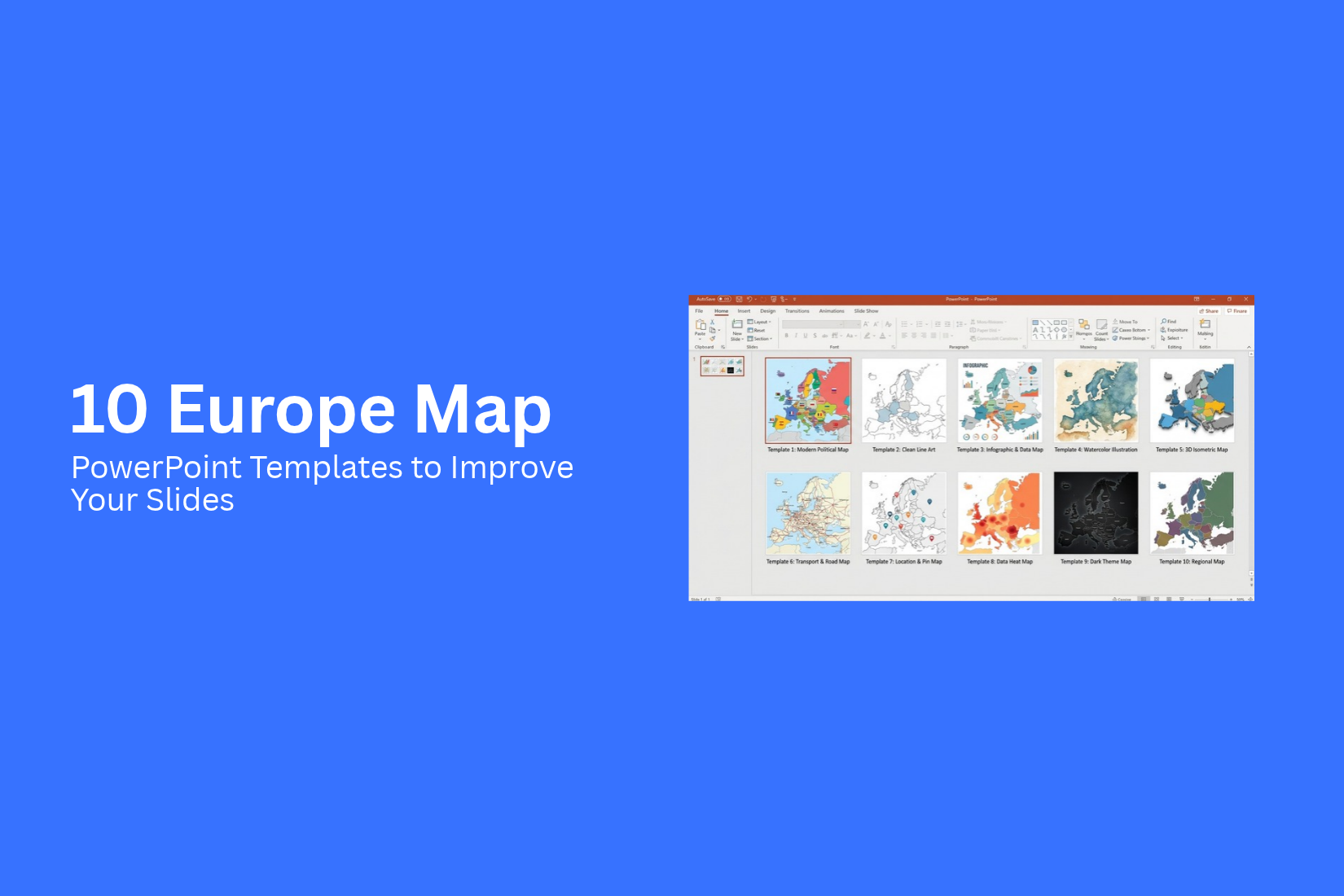
A Europe map can help explain country locations, regional differences, and travel routes in a PowerPoint presentation. However, a map with unclear labels or a poor layout can make your slides hard to follow. Small country names, crowded details, and mismatched colors can also distract your audience from the main point.
The right template can make your map easier to read and present. It can also help you highlight key countries, mark important cities, and share geographic data in a clear way. This guide covers 10 Europe Map PowerPoint Templates for different needs. You’ll also learn about map types, template selection, customization options, and tips for creating clear, well-organized slides.
Why Use Europe Map PowerPoint Templates?
Europe maps help you show locations, regions, and country borders in a clear way. They make it easier for your audience to follow your points. A Europe map PowerPoint template also saves time. You do not need to draw a map or build each slide from scratch.
These templates work well for business reports, travel plans, market research, and school projects. You can use them to mark target markets, compare countries, or show sales data across Europe. Some templates also let you change country colors, add labels, and highlight key areas. The right map template keeps your slides neat and easy to read. It also helps your audience understand location-based data at a glance.
Different Types of Europe Maps for Presentations
Europe maps come in many styles. Each type serves a different purpose in a presentation. Some show country borders, while others focus on capital cities, famous landmarks, or travel spots. The right map helps your audience understand the topic with less effort.
Europe Map
A Europe map shows the countries across the continent. It can include country names, borders, and major regions. This type of map works well for business reports, school projects, and travel presentations. You can use different colors to mark countries or show key areas.
Capital Cities of Europe
A map of European capital cities helps people locate the main cities of each country. It can show city names and their locations on the map. This format is useful for geography lessons, travel plans, and reports about European markets. Add clear labels to help your audience find each capital city.
Blank Map of Europe
A blank map of Europe shows country borders without names or other details. It gives you room to add your own labels, colors, and notes. Teachers can use it for quizzes and classroom activities. Business teams can also mark target markets or areas of interest. Its simple layout keeps the focus on the information you add.
Where Is Europe on the Map?
A map that shows where Europe is located helps viewers understand its place in the world. It can show Europe alongside Asia, Africa, and other nearby regions. This map style is useful for educational slides, travel presentations, and global business reports. A world map with Europe highlighted makes the location easy to spot.
Europe Landmarks
A Europe landmarks map highlights famous places across the continent. It can mark historic sites, well-known buildings, and popular tourist spots. This type of map fits travel guides, tourism reports, and cultural presentations. Add labels or small images to show where each landmark is located.
Best Cities to Visit in Europe
A map of the best cities to visit in Europe helps viewers see several travel destinations at once. You can mark cities with pins, names, or different colors. This layout works well for travel guides, tour plans, and vacation presentations. It also helps you show the location of each city and plan a route between destinations.
Europe Peninsula Maps
Europe has several peninsulas that extend into nearby seas. Peninsula maps help explain the shape of these land areas and the countries they include. They are useful for geography lessons, regional studies, and travel presentations.
Balkan Peninsula
The Balkan Peninsula is in southeastern Europe. A map of this region can show its countries, borders, and nearby seas. It works well for lessons about European geography, regional history, and travel routes.
Iberian Peninsula
The Iberian Peninsula lies in southwestern Europe. It includes Spain and Portugal, along with smaller areas. A map of this peninsula helps viewers understand the location of these countries and their nearby coastlines. It suits geography lessons, travel plans, and regional business reports.
Oldest Cities in Europe
A map of the oldest cities in Europe can highlight places with long histories. It can mark each city and show its location within the continent. This type of map is useful for history lessons, cultural tours, and travel presentations. Add short notes about each city to give viewers more context without filling the slide with too much text.
10 Europe Map PowerPoint Templates to Improve Your Slides
Maps help people understand places and regional data. They can show where a business operates, which markets it serves, or how a region connects to a larger plan. A map also gives your audience a clear view of the area discussed in your presentation.
Europe map PowerPoint templates suit many topics. You can use them for business reports, sales plans, travel presentations, market research, and educational slides. Some focus on a single country, while others cover a group of countries or a full region.
The key is to match the map to your topic. A country map works well for local reports. A regional map is better for presentations that cover several markets. Here are 10 Europe map PowerPoint templates to help you present geographic information with clarity.
1. European Union Map PowerPoint Template
The European Union Map PowerPoint Template is a useful option for presentations about EU countries, regional trade, and business operations. It gives your audience a geographic view of the union. This can help explain where a company works or which countries are part of a market plan.
You can use this template in business reports, policy presentations, education slides, and market research. For example, a sales team can use a map to show its coverage across EU countries. A research team can use it to present data from different member states.
Add short labels or data points to show the areas linked to your topic. You can also pair the map with a chart or a small table. This helps connect geographic information with facts and figures. Keep the main message clear so your audience can understand the map without reading too much text.
2. Editable Estonia Map PowerPoint Template
The Editable Estonia Map PowerPoint Template is suited to presentations that focus on Estonia. It can help show the location covered by a report, explain a business plan, or provide context for local market data. A country map also helps keep the focus on one geographic area.
This template can support business proposals, market studies, travel presentations, and classroom lessons. A company planning to enter the Estonian market can use a map to introduce the country before presenting sales figures or business goals. A tourism presentation can use it to show the areas covered by a trip or travel plan.
You can build the slide around one main point. Add a title that explains why Estonia matters to your topic. Place key figures or short notes beside the map. This layout gives the audience two useful pieces of information: where the activity takes place and what the data means.
3. Sweden Map PowerPoint Template
The Sweden Map PowerPoint Template works well for presentations about Swedish markets, regional planning, and business locations. It provides a geographic base for information about the country. This is helpful for reports that cover several locations or compare activity across different areas.
You can use the template in sales presentations, tourism plans, research reports, and company updates. A business can show its service areas across Sweden. A travel planner can use the map to explain a route between destinations. An education slide can also use it to introduce the country's geography.
For business presentations, pair the map with a few relevant figures. These might include sales totals, customer counts, or the number of locations covered by a report. Use clear labels to connect each figure to the right area. Avoid filling the slide with too many details. A focused map makes the main point easier to follow.
4. Editable DACH Map PowerPoint Template
The Editable DACH Map PowerPoint Template is a practical choice for presentations about Germany, Austria, and Switzerland. These three countries are often grouped together in business and market reports. A DACH map helps show the geographic scope of a plan that covers all three markets.
This template can support regional sales plans, business proposals, market research, and company reports. For example, a sales team can use it to show its coverage in Germany, Austria, and Switzerland. A marketing team can use it to explain a regional campaign. A company can also use the map to present its expansion plans across the DACH region.
Give each country a clear place in the slide layout. You can add short notes about sales goals, customer groups, or business activity. A small chart beside the map can show how the three markets compare. Keep the same style for labels and data points across the slide. This helps your audience compare the information without extra effort.
5. Europe Map PowerPoint Template
The Europe Map PowerPoint Template is a flexible choice for presentations that cover the wider European region. It can support business reports, travel plans, education slides, and regional research. Use it to introduce locations before sharing data about markets, countries, or travel destinations.
This template is helpful for presentations that need a broad geographic view. A company can show the countries where it sells products. A travel agency can present a route across Europe. A teacher can use the map to explain the location of different countries. Each use gives the audience a clear view of the region discussed in the slide.
Start with a clear title that states the purpose of the map. Add labels or markers only for the places that matter to your topic. For a market report, you could group information by region or country. For a travel presentation, you could mark the main stops on a route. Keep extra details in a separate text area so the map remains easy to read.
6. Editable Europe Map PowerPoint Template
The Editable Europe Map PowerPoint Template is a good fit for presentations that need a map tailored to a specific topic. An editable map can help you adjust the visual details to match your message. This is useful for showing selected countries, regional coverage, or areas linked to your data.
You can use this template for sales reports, business plans, market research, and project updates. For example, a company can highlight the countries included in a sales campaign. A research team can mark the areas covered by a study. A project manager can use the map to show which regions are part of a rollout plan.
Build the slide around a clear goal. Highlight the countries or areas that support your message. Add a short note or a key figure beside the map to explain each highlight. Use a simple color scheme and consistent labels. These choices help the audience understand the information without making the slide feel crowded.
7. London City Map PowerPoint Template
The London City Map PowerPoint Template suits presentations that focus on London and its local areas. It can help explain business locations, travel routes, property plans, or city-based research. A city map gives the audience a closer view of the places discussed in your presentation.
This template can work well for real estate presentations, tourism plans, company reports, and local market studies. A property team can use it to show the location of selected sites. A travel planner can mark key stops on a city route. A business can also use it to show the areas covered by its services.
Add only the locations that matter to your message. Use short labels to identify offices, properties, or points of interest. You can place a brief description or a key figure beside the map. For a property report, this could be a list of selected sites. For a tourism slide, it could be a short route with the main stops. A clean layout helps your audience focus on the places that matter.
8. Frankfurt Map PowerPoint Template
The Frankfurt Map PowerPoint Template is suited to presentations about Frankfurt and its surrounding areas. It can provide geographic context for business activity, local planning, travel, and market research. The map helps your audience see the location connected to the report or proposal.
You can use it in company presentations, office location plans, property reports, and tourism slides. A business can show where its office or service area is located. A property team can mark sites under review. A travel presentation can use the map to show key places in the city and explain how they relate to the main topic.
For a business report, pair the map with a few relevant facts. These might cover office locations, market coverage, or project areas. Use clear markers and short labels to identify each place. Keep the supporting text brief and place it beside the map. This gives your audience the geographic details they need without taking attention away from the main message.
9. Editable Iberian Peninsula Map Template
The Editable Iberian Peninsula Map Template is a useful option for presentations about Spain, Portugal, and the wider peninsula. It can help explain regional markets, travel plans, business coverage, or research linked to this part of Europe. The map provides a shared geographic view for topics that involve both countries.
This template can support sales plans, tourism presentations, regional reports, and market studies. A company can use it to show its coverage across Spain and Portugal. A travel planner can present a route between locations in the region. A research team can use it to show where data was collected.
You can tailor the slide to match the purpose of your presentation. Highlight the areas related to your report and add short notes beside the map. For a business plan, show the markets included in the project. For a travel presentation, mark the main stops along the route. Use a clear legend to explain the map's colors or symbols. This helps your audience read the information with less effort.
10. Editable Ireland Map PowerPoint Template
The Editable Ireland Map PowerPoint Template works well for presentations about Ireland. It can help show regional coverage, explain a business plan, or provide geographic context for local research. A country map is useful for reports that focus on specific areas rather than a wider European market.
This template can support tourism plans, business proposals, sales reports, education slides, and regional studies. A company can use it to show the areas covered by its services. A tourism team can mark destinations on a travel plan. A research presentation can use the map to show where the information comes from.
Keep the slide focused on the main topic. Add clear labels for the relevant areas and use a short note to explain each key point. You can also place a chart beside the map to show related data. For example, a regional report could pair the map with figures from the areas included in the study. Make sure the labels and figures are easy to read from a distance.
A good map slide does more than show a location. It helps your audience connect a place with the information you are sharing. Choose the template that matches your geographic focus, keep the layout clear, and use labels or data points that support your main message.
How to Choose the Right Europe Map PowerPoint Template
The right Europe map template depends on your presentation goal. A business report may need clear country borders and data labels. A travel presentation may need a simple map with marked locations. Choose a template that helps your audience understand the main point.
Match the Map to Your Presentation Goal
Start with the message you want to share. A sales report may need country colors to show regional results. A travel plan may need city names and route lines. A market report may need space for numbers and labels. Pick a map style that supports your topic and keeps the main message clear.
Check Country Borders and Geographic Details
Country borders help viewers identify each location. Check the map for clear borders, correct country shapes, and readable labels. Make sure the map includes the areas you need. Small details can be hard to read on a slide, so choose a map that stays clear at your presentation size.
Look for Editable Map Features
An editable map gives you more control over your slides. You can change country colors, add labels, and mark key locations. Some templates also let you move map parts or adjust their size. These features help you match the map to your data and slide layout.
Check that the template works with your preferred software. Also, make sure you can edit the map without losing its shape or detail.
Choose a Design That Fits Your Slides
Your Europe map should match the rest of your presentation. Check the colors, fonts, labels, and overall layout. A clean design helps your audience focus on the map instead of extra details.
Leave enough space for titles, charts, and notes. Avoid maps with too many colors or small labels. A simple layout can make country data easier to read and help your slides look consistent.
How to Customize Europe Map Templates in PowerPoint
Europe map templates can help you present country-level data in a clear way. You can edit the map to match your topic, brand colors, and data. Small changes can also help your audience read the map with less effort.
Change Country Colors
Country colors help you show differences across Europe. Use a separate color for each group or category. For example, you can use blue for countries with high sales and gray for countries with low sales.
Keep the color scheme simple. Use colors that are easy to tell apart. Make sure the text stands out against each country’s fill color. A clear color key can also help readers understand what each shade means.
Add Country Names and Location Markers
Country names help your audience identify places on the map. Add labels to the countries that matter most to your topic. Use a readable font size and keep the text clear.
Small countries may not have enough space for labels. Place their names beside the map and use lines to point to the right locations. You can also add markers for cities, offices, stores, or other key locations. Use a short label for each marker to keep the map easy to read.
Highlight Specific Countries or Regions
A map can help direct attention to a few key areas. Use a bright color to highlight selected countries. Keep the remaining countries in light, neutral shades. This creates a clear contrast.
For example, a business presentation can highlight the countries where a company operates. A travel presentation can mark the countries included in a tour. You can also use borders or simple shapes to group nearby countries into regions. Keep the style consistent across your slides.
Add Data Labels and Supporting Charts
Data labels give your map more meaning. Add figures such as sales, market share, population, or customer numbers to the relevant countries. Use short labels and avoid placing too much text inside small areas.
Charts can help explain the numbers in more detail. Place a bar chart beside the map to compare countries. Use a legend to explain color groups or data ranges. Keep the chart and map focused on the same topic.
For a clean slide, show only the data your audience needs. A simple map with a few clear labels can explain a point better than a crowded slide.
Tips for Using Europe Maps in Presentations
A Europe map can help your audience understand locations, regions, and country groups. Good design makes the map easier to read and follow. Use these tips to keep your map clear and useful.
Keep Map Labels Easy to Read
Country names and city labels should be easy to read from a distance. Use a clear font and a suitable text size. Avoid placing too many labels close together. Small text can make the map hard to follow, especially on large screens. Add labels only to the places that support your main point.
Use Colors Consistently
Colors can help your audience tell countries and regions apart. Use the same color for the same type of data across your slides. For example, use blue for one group of countries and green for another. Keep the color choices simple. Too many colors can make the map harder to understand. Check that the text stands out against each map color.
Focus on Important Locations
A map with too many details can distract your audience. Highlight only the countries, cities, or regions that matter to your topic. Use a bold color or a simple marker to show key locations. You can also add short labels to point out important places. This helps your audience focus on the main message without sorting through extra details.
Verify Geographic Information
Check the map before adding it to your slides. Make sure country names, borders, and locations are correct. Pay close attention to disputed borders and regional boundaries. Use a map that fits your topic and purpose. Correct geographic details help your audience follow your message and trust the information in your presentation.
Where to Find Europe Map PowerPoint Templates
Finding the right Europe map template can save time and make your slides easier to read. You can look for templates with country borders, country names, and editable colors. These features help you present data about different parts of Europe.
Template websites offer different map styles for business reports, travel plans, sales data, and market research. Some templates focus on the whole continent, while others show individual countries in more detail.
Before choosing a template, check its editing options and file format. Make sure it works with your presentation software. An editable map also lets you change colors, add labels, and highlight specific countries to match your data.
Final Notes
A Europe map can help you present country locations, regional data, and travel routes in a clear way. The right PowerPoint template saves time and gives you more control over your slide design. It also helps you highlight key countries, add useful labels, and present geographic data in a simple format.
Choose a template that fits your presentation goal. Check its country borders, labels, and editing options before you start. Use clear colors and highlight only the locations that support your main point. Keep your layout simple and make sure every label is easy to read. With the right Europe map PowerPoint template, you can create slides that help your audience understand the places and data you present.
FAQs
1. What is a Europe Map PowerPoint Template?
A Europe Map PowerPoint Template is a ready-made slide design with a map of Europe. It helps you show countries, borders, cities, and regional data. You can use it for business reports, travel plans, and school presentations.
2. How can I use a Europe map in PowerPoint?
You can use a Europe map to show country locations, compare regional data, mark key cities, or explain travel routes. Add labels, colors, and data points to match your presentation topic.
3. Can I edit Europe Map PowerPoint Templates?
Yes, editable templates let you change country colors, add labels, mark locations, and adjust the slide layout. Check the template details to make sure its map elements can be edited in your presentation software.
4. What are the different types of Europe maps for presentations?
Common types include full Europe maps, blank maps, capital city maps, landmark maps, and country maps. You can also use regional maps, such as the Balkan Peninsula or Iberian Peninsula, to focus on a specific area.
5. How do I choose the right Europe map template?
Start with your presentation goal. Choose a full Europe map for regional reports, a country map for local data, or a city map for location-based details. Check the labels, country borders, colors, and editing options before selecting a template.
6. How can I highlight specific countries on a Europe map?
Use different fill colors, borders, or location markers to highlight selected countries. Add a legend to explain the colors or symbols. Keep the remaining map details simple so your audience can spot the key areas.
7. How can I make a Europe map easy to read in PowerPoint?
Use clear labels, readable fonts, and a simple color scheme. Highlight only the locations related to your topic. Leave enough space for charts and notes. Avoid adding too much text to the map.
8. Can I use Europe map templates for business presentations?
Yes, Europe map templates work well for sales reports, market research, regional business plans, and company updates. You can use them to show market coverage, compare country-level data, and mark business locations.
9. What is the difference between a blank Europe map and an editable Europe map?
A blank Europe map shows country borders with few or no labels. It gives you space to add your own details. An editable Europe map lets you change map elements, such as country colors and labels, based on the features included in the template.
10. Where can I find Europe Map PowerPoint Templates?
You can find Europe map templates on presentation template websites. Check the available map styles, file formats, and editing features. Choose a template that works with your software and supports the needs of your presentation.



You may also be interested in ...

Best PowerPoint Templates For Real Estat...
PowerPoint presentations have a stigma of being plain, boring, and overall tedious to go through. But things have changed ove...
23 Jun, 2024

How To Easily Create An Infographic
Infographics are the perfect way to make a presentation that will impact an audience, but their design and composition might...
08 Jun, 2024

The Ultimate Social Media Presentation T...
Social media platforms are perhaps one of the best ways to present your work, attract clients and scale your business. Whethe...
23 Jun, 2024