How to Create a Great 10 Minute Presentation: Topics, Examples & Tips
Creating a great 10-minute presentation can be challenging for many people. Choosing the right topic, organizing ideas, and sharing a clear message within a short time can feel difficult. A weak structure may leave important points unclear and make the presentation less effective for audiences.
With a clear plan, you can build a focused presentation that fits the time limit. This guide covers topic ideas, examples, and simple tips to help you create a strong 10-minute presentation. It also explains how to choose topics, structure slides, and deliver your message with confidence. You will find useful steps for planning and presenting a clear and engaging talk in just 10 minutes.
What is a 10 Minute Presentation?
A 10-minute presentation is a short talk designed to share ideas, explain a topic, or present information in a clear way. It gives you enough time to cover the main points without adding too many details.
This type of presentation usually focuses on one clear message. The speaker picks a topic, organizes the key ideas, and uses slides or visuals to support the talk. Each section needs a clear purpose so the audience can follow along easily.
A 10-minute presentation often includes:
• A short introduction to explain the topic.
• Two or three main points with useful details.
• Examples, data, or stories to support the ideas.
• A closing message that leaves the audience with a clear takeaway.
The short time limit makes planning very important. Too much information can make the presentation hard to follow. A focused topic helps you explain your ideas better and keep the audience interested. This format works well for school projects, work meetings, training sessions, and public speaking events. It helps speakers practice clear communication and share useful information in a limited time.
How to Choose the Right 10 Minute Presentation Topic
A good topic helps you create a clear and focused presentation. A 10-minute presentation gives you limited time, so your topic should be simple enough to explain without rushing. Start by choosing a subject that matches your audience. A classroom audience may enjoy educational topics. A work team may need ideas related to projects, skills, or industry trends. Knowing who will listen helps you pick a topic that feels useful and relevant. Your goal also shapes your topic choice. A presentation that teaches a skill needs a different approach than one that shares ideas or tells a story. Pick a topic that supports the main message you want your audience to remember. A narrow topic often works better than a broad one. A large subject can be hard to cover in 10 minutes. Choose one clear idea and build your slides around key points. This keeps your presentation easy to follow. Your interest in the topic matters too. A topic you enjoy talking about makes it easier to prepare and present with confidence. Your energy can help keep your audience focused from the start to the end.
10 Minute Presentation Topics by Category
A 10-minute presentation needs a topic that is clear and focused. A good topic helps you share key points without adding extra details. These categories can help you find a subject that fits your audience and goal.
Education Presentation Topics
Education topics work well for students, teachers, and learning groups. These ideas help explain concepts, share knowledge, and start discussions.
• How online learning changes education
• Study habits that help students succeed
• The role of creativity in learning
• Benefits of reading every day
• How schools can support student skills
• The history of a famous invention
• Ways to improve classroom learning
Business and Workplace Presentation Topics
Business topics are useful for team meetings, training sessions, and professional events. They focus on work skills, company ideas, and daily challenges.
• How teamwork improves workplace results
• Ways to improve customer service
• The role of communication at work
• How companies build strong teams
• Time management tips for employees
• Common workplace challenges and solutions
• How small businesses grow
Technology Presentation Topics
Technology topics can explain new tools, trends, and how technology affects daily life.
• How artificial intelligence works
• The role of technology in education
• Benefits of cloud storage
• How smartphones changed communication
• The basics of cybersecurity
• How robots are used in different fields
• The future of smart devices
Science Presentation Topics
Science topics help explain discoveries, natural events, and research ideas in a simple way.
• How the human body uses energy
• The process of climate change
• How vaccines protect people
• The science behind sleep
• How plants support life on Earth
• The basics of space exploration
• How animals adapt to their surroundings
Health and Wellness Presentation Topics
Health topics can focus on habits, lifestyle choices, and personal care.
• Benefits of regular exercise
• How sleep affects health
• Ways to manage daily stress
• Healthy eating habits
• The connection between mental and physical health
• The effects of screen time
• Simple habits for a healthier life
Environment and Sustainability Presentation Topics
These topics help explain environmental issues and ways people can protect natural resources.
• Causes of air pollution
• Ways to reduce plastic waste
• The role of renewable energy
• How recycling helps the environment
• Protecting wildlife and natural areas
• Water conservation methods
• Sustainable choices for daily life
History Presentation Topics
History topics are useful for sharing stories, events, and lessons from the past.
• The life of a famous historical figure
• Major events that changed the world
• The history of a country
• The story behind an invention
• Ancient civilizations and their achievements
• Important historical movements
• Lessons from past events
Psychology Presentation Topics
Psychology topics help explain human thoughts, emotions, and behavior.
• How habits are formed
• The science of motivation
• Why people make certain decisions
• The role of emotions in daily life
• How memory works
• The effects of social media on behavior
• Ways to improve self-awareness
Marketing Presentation Topics
Marketing topics are useful for business students, teams, and creative professionals.
• Basics of brand building
• How social media marketing works
• The role of customer feedback
• Common marketing mistakes
• How storytelling helps brands
• Creating a simple marketing plan
• Understanding customer needs
Finance Presentation Topics
Finance topics help explain money management, business finance, and economic ideas.
• Basics of personal budgeting
• How saving habits build financial security
• Understanding income and expenses
• The role of investments
• Common money mistakes
• How businesses manage costs
• Basic financial planning tips
Leadership Presentation Topics
Leadership topics focus on skills that help people guide teams and make better choices.
• Qualities of a good leader
• How leaders build trust
• The role of communication in leadership
• Ways to solve team conflicts
• How leaders support growth
• Decision-making skills for leaders
• Building a positive team culture
Personal Development Presentation Topics
Personal development topics help people improve skills, habits, and confidence.
• Setting clear personal goals
• Building better daily habits
• Improving communication skills
• Managing time better
• Learning from mistakes
• Building confidence
• Creating a personal growth plan
Fun and Creative Presentation Topics
Fun topics can make presentations more enjoyable and encourage audience participation.
• The story behind a favorite movie
• Ranking the best inventions
• Strange facts about everyday items
• The history of popular games
• Creative ways to solve common problems
• The psychology behind favorite hobbies
• Fun comparisons between different trends
10 Minute Presentation Examples
A 10-minute presentation needs a clear goal, simple structure, and focused message. The short time limit makes every slide count. A strong presentation usually starts with a clear introduction, shares the main points, and ends with a message the audience can remember. Different presentation types need different approaches. An informative talk shares knowledge. A persuasive talk supports an idea. A demonstration shows a process. Business and student presentations focus on specific goals and audiences.
Here are some 10-minute presentation examples to help you plan your next talk.
Informative Presentation Example
An informative presentation helps the audience learn about a topic. The goal is to explain facts, ideas, or processes in a simple way.
Example topic: How Sleep Affects Student Performance
A 10-minute informative presentation can include:
• Introduction: Explain why sleep matters.
• Main point 1: Share how sleep affects focus and memory.
• Main point 2: Explain common causes of poor sleep.
• Main point 3: Share simple ways to build better sleep habits.
• Ending: Recap the key ideas.
Charts, images, and short examples can help explain information clearly. Keep the focus on teaching rather than adding too many details.
Persuasive Presentation Example
A persuasive presentation aims to change opinions or encourage action. It uses facts, examples, and clear reasons to support a point.
Example topic: Why Schools Should Add More Outdoor Learning Activities
A 10-minute persuasive presentation can follow this structure:
• Introduction: Present the main issue.
• Main point 1: Explain the benefits of outdoor learning.
• Main point 2: Share examples that support the idea.
• Main point 3: Address common concerns.
• Ending: Ask the audience to support the idea.
A strong persuasive presentation connects with the audience’s needs. Each point should help answer the question, “Why does this matter?”
Demonstration Presentation Example
A demonstration presentation teaches the audience how to complete a task. It works best with a step-by-step format.
Example topic: How to Create a Simple Budget Spreadsheet
A 10-minute demonstration can include:
• Introduction: Explain the purpose of the spreadsheet.
• Step 1: Show how to create the basic layout.
• Step 2: Add income and expense sections.
• Step 3: Explain how to track spending.
• Ending: Show the finished result.
Screenshots, live examples, and short instructions make the process easier to follow. Each step should be clear and easy to repeat.
Business Presentation Example
A business presentation shares ideas, plans, reports, or recommendations. It needs a clear message and a strong focus on the audience’s needs.
Example topic: Plan to Improve Customer Service
A 10-minute business presentation can include:
• Introduction: Explain the current challenge.
• Main point 1: Share key problems or findings.
• Main point 2: Present possible solutions.
• Main point 3: Explain expected results.
• Ending: Share the next steps.
Use simple charts and data points to support your ideas. Avoid adding information that does not help your main message.
Student Presentation Example
A student presentation helps explain a subject, research topic, or class project. It should show understanding and keep the audience interested.
Example topic: The Impact of Social Media on Teen Communication
A 10-minute student presentation can include:
• Introduction: Introduce the topic and main question.
• Main point 1: Explain how social media changes communication.
• Main point 2: Share positive and negative effects.
• Main point 3: Present examples or research findings.
• Ending: Share the main lesson.
Students can use visuals, short examples, and simple explanations to make their presentations easier to follow. A clear structure helps the audience stay focused from start to finish.
How to Structure a 10 Minute Presentation
A 10-minute presentation needs a clear structure. You have limited time to share your ideas, so every section should have a purpose. A simple flow helps your audience follow your message without getting lost. A good structure usually includes an opening, three main points, supporting visuals, and a clear ending. This format gives your presentation a natural flow from start to finish.
Start With a Strong Opening
The first minute sets the tone for your presentation. Start with something that gets your audience’s attention. You can open with a question, a short story, a surprising fact, or a clear statement about your topic. Your opening should tell the audience what they will learn. It should also explain why the topic matters. Avoid spending too much time on background details. Move quickly into the main idea. A strong opening helps your audience stay focused from the beginning.
Present Three Main Points
A 10-minute presentation works best with three key points. Too many ideas can make your message harder to follow. Too few points may leave your presentation feeling incomplete. Choose three ideas that support your main message. Give each point enough time for a short explanation and example.
A simple structure can look like this:
• Point 1: Introduce the first main idea
• Point 2: Explain the second important idea
• Point 3: Share the final key takeaway
Use clear transitions between each point. This helps your audience understand how each idea connects to the next one.
Use Visuals to Support Your Message
Visuals can make your presentation easier to understand. Use images, charts, diagrams, or short examples to explain your ideas. Keep your slides simple. Avoid adding too much text. A slide should support your speech, not replace it. Choose visuals that match your message. A useful image or chart can explain an idea faster than a long paragraph.
End With a Clear Conclusion
The final minute is your chance to leave a strong message. Repeat your main points and remind the audience of the key idea. A good ending should feel complete. Share a final thought, a short recommendation, or a clear action step. Avoid adding new information at the end. Keep your closing focused on the ideas your audience already heard.
Sample 10 Minute Presentation Timeline
A simple timeline can help you manage your presentation time:
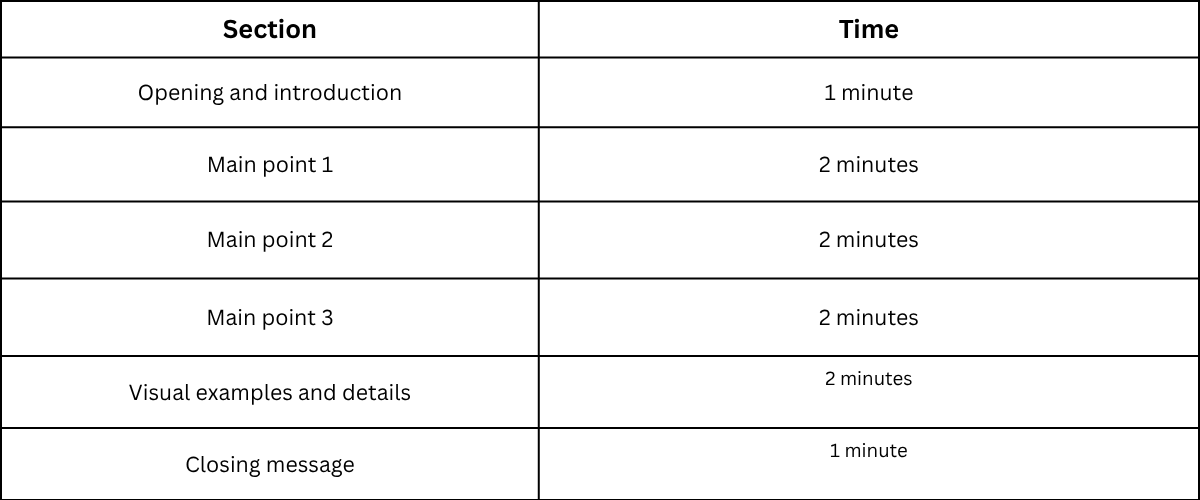
This structure gives each part enough space while keeping your presentation organized. Practice with a timer to make sure you stay within the 10-minute limit.
Tips for Delivering a Great 10 Minute Presentation
A great 10-minute presentation needs more than good slides. Your delivery plays a big role in keeping people interested. A clear structure, steady pace, and strong connection with your audience can make your message easier to follow. Use these tips to make your short presentation more effective.
Practice Your Timing
A 10-minute presentation does not give you much room to go off track. Practice your full presentation several times before the actual event. Check how long each section takes and remove any parts that feel too long. Create a simple plan for your time. Spend the first minute introducing your topic. Use the middle section to explain your main points. Save the last minute for a strong closing message. Practicing also helps you feel more comfortable with your content. You will know what to say and avoid rushing through your slides.
Keep Your Slides Simple
Your slides should support your message, not distract from it. Use short text, clear images, and simple layouts. A slide filled with too much information can make it hard for your audience to follow along. Focus on one main idea per slide. Use bullet points to highlight key details. Choose readable fonts and keep the design consistent throughout the presentation. Simple slides help your audience focus on what you say instead of trying to read a large amount of text.
Speak Clearly and Confidently
Your voice can shape how people receive your message. Speak at a steady speed and pronounce your words clearly. Avoid speaking too fast, as your audience may miss important points. Use pauses to give people time to understand your ideas. Maintain good posture and make eye contact with different people in the room. Confidence grows with practice. The more familiar you are with your topic, the easier it becomes to speak naturally.
Engage Your Audience
A presentation feels stronger when people feel involved. Ask a question at the start to get their attention. Share a short example or story that connects with your topic. You can also invite your audience to share quick thoughts or experiences. Small interactions can make your presentation more memorable. Pay attention to their reactions. Adjust your tone or explanation if people seem confused or less interested.
Handle Questions Effectively
Questions are a chance to explain your ideas better. Listen carefully before answering. Take a moment to understand what the person is asking. Give short and direct answers. If a question needs more detail, explain the main point first and offer more information after the presentation. Stay calm if you do not know an answer. Be honest and let the person know you will find the right information later. A thoughtful response shows that you respect your audience.
10 Minute Presentation Slide Template
A 10-minute presentation needs a clear slide structure. Each slide should have a specific purpose. A simple format helps your audience follow your ideas without feeling lost. A good slide plan also helps you manage your time and keep your message focused. A basic 10-minute presentation can include five key slide types: a title slide, introduction slide, main point slides, summary slide, and Q&A or call-to-action slide.
Title Slide
The title slide creates the first impression of your presentation. It should include the presentation title, your name, and any other needed details. Keep this slide clean. Avoid adding too much text or extra design elements. A simple title helps the audience understand your topic right away. For example, a presentation about online learning may start with a title like “How Online Learning Changes Student Habits.” The title gives the audience a clear idea of what they will learn.
Introduction Slide
The introduction slide explains the purpose of your presentation. It gives your audience a quick overview of the topic.
Use this slide to share:
• The main topic
• Why the topic matters
• The key points you will cover
A strong introduction creates interest and prepares people for the next slides. Keep the information short so you have more time to explain your main ideas.
Main Point Slides
The main point slides contain the core information of your presentation. A 10-minute presentation usually works well with two to four main points. Each slide should focus on one idea. Use short text, visuals, charts, or examples to support your message.
A simple structure can be:
• Main idea
• Supporting details
• Example or proof
Avoid placing large blocks of text on slides. Your slides should support your speech, not replace it.
Summary Slide
The summary slide helps your audience remember the main ideas. It brings the key points together in a simple way. Use short statements that highlight the most important parts of your presentation. This slide also gives you a chance to repeat your main message before ending. A clear summary leaves your audience with a better understanding of your topic.
Q&A or Call to Action Slide
The final slide gives your audience a chance to respond or take the next step. A Q&A slide can include a simple message like “Questions?” This invites people to share their thoughts or ask for more details. A call-to-action slide works well for business, marketing, or project presentations. It can tell your audience what action they should take after your presentation. Keep this slide simple. End with a clear message that matches the goal of your presentation.
Final Notes
A successful 10-minute presentation starts with a clear goal and a focused topic. A simple structure helps you share your ideas without adding extra details. Choose a topic that fits your audience, organize your points, and use slides that support your message. Practice helps you manage your time and speak with confidence. Focus on your main ideas, use helpful visuals, and keep your delivery natural. A well-planned presentation can share useful information and create a strong connection with your audience in just 10 minutes. Use these tips, examples, and slide ideas as a guide for your next presentation. With the right preparation, you can create a short talk that is easy to follow and leaves a lasting message.
FAQs:
How many slides should a 10-minute presentation have?
A 10-minute presentation usually works well with around 5 to 10 slides. The exact number depends on your topic and the amount of information you need to share. Each slide should focus on one main idea.
How do I choose a good 10-minute presentation topic?
Choose a topic that matches your audience and your goal. Pick a subject that is clear, focused, and easy to explain in a short time. A narrow topic often works better than a broad one.
What should be included in a 10-minute presentation?
A 10-minute presentation should include a short introduction, two or three main points, supporting examples or visuals, and a clear ending. Each part should support your main message.
How long should each slide take in a 10-minute presentation?
Most slides may take about one to two minutes to explain. Spend more time on important ideas and less time on simple points. Practice with a timer to keep your presentation within the limit.
How can I make my 10-minute presentation more engaging?
Use simple slides, clear examples, and a strong opening. Ask questions, share short stories, or include visuals that help explain your ideas. A clear message keeps your audience focused.
What is the best structure for a 10-minute presentation?
A simple structure includes an introduction, three main points, supporting visuals, and a closing message. This format helps you explain your topic in a clear order.
How do I practice for a 10-minute presentation?
Practice your full presentation several times before presenting. Check your timing, improve areas that feel too long, and practice speaking clearly. Knowing your content helps you feel more comfortable.
Should I use slides for a 10-minute presentation?
Slides can help support your message. Use short text, images, charts, or diagrams to explain ideas. Avoid adding too much information because your slides should support your speech, not replace it.
How do I end a 10-minute presentation?
End by repeating your main message and sharing the key takeaway. You can also add a final thought, recommendation, or invite questions from the audience. A clear ending helps people remember your presentation.



You may also be interested in ...

How To Create An Eye-Catching Portfolio
If you’re looking to create an eye-catching portfolio, this post will come in handy. In this article, you can find the easies...
23 Jun, 2024

How To Easily Create An Infographic
Infographics are the perfect way to make a presentation that will impact an audience, but their design and composition might...
08 Jun, 2024

PowerPoint Template Tips & Tricks You Ne...
PowerPoint seems to be an unknown world for many people, especially those who have been assigned to create a presentation out...
08 Jun, 2024