How to Craft a Cinematic Presentation: Benefits and Defining Characteristics
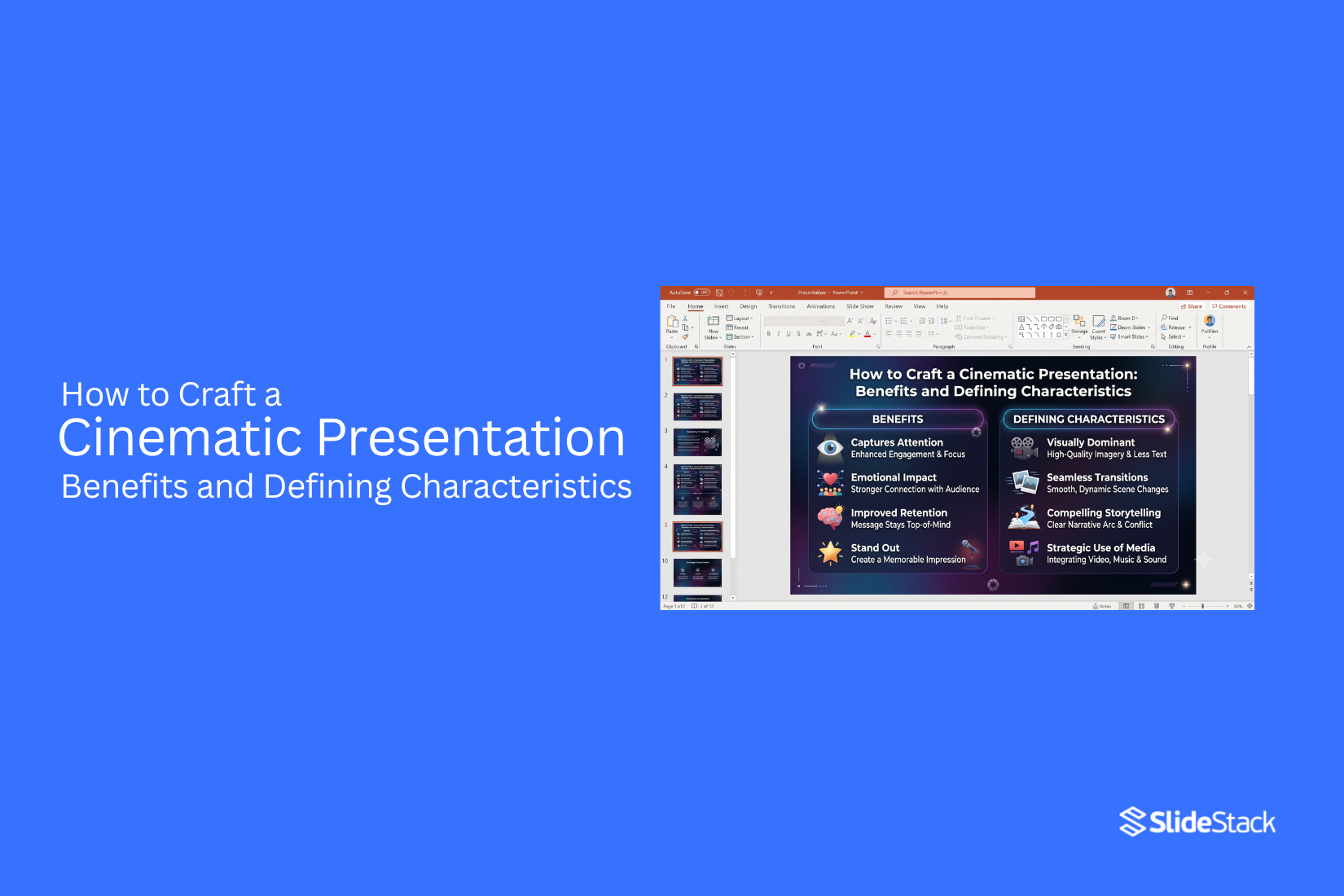
Many presentations share ideas but fail to hold attention because they feel flat and predictable. A cinematic presentation changes the experience by using strong visuals, clear flow, and a story that guides the audience from one moment to the next. It creates a more engaging path. From there, this style helps presenters build interest through visual storytelling, thoughtful design choices, and a clear message. A cinematic presentation can make complex topics easier to follow and create stronger emotional moments for the audience. The right structure, visuals, and design choices help shape a presentation that feels polished. This article explains the key features, benefits, and steps to craft a cinematic presentation.
What Is a Cinematic Presentation?
A cinematic presentation tells a story through visuals, pacing, and emotion. It uses design ideas from movies to create a more engaging slide experience. Each slide feels like part of a larger story instead of a group of separate pages. This type of presentation focuses on strong visuals, clear messages, and smooth movement between ideas. Images, colors, fonts, and animations work together to support the story. The goal is to help the audience follow the message and stay focused.
A regular presentation often shares information in a direct format. A cinematic presentation adds a storytelling layer. It uses scenes, mood, and timing to guide the audience from one point to the next. A cinematic presentation does not need complex effects. A simple layout with the right images and a clear story can create a strong impact. The key is making every slide feel connected and meaningful.
Why Create a Cinematic Presentation?
A cinematic presentation uses visuals, pacing, and storytelling to create a stronger viewing experience. It feels more like a short film than a simple slideshow. This style helps audiences stay focused and follow the message from start to finish.
Captures Audience Attention
People respond to strong visuals and clear stories. A cinematic presentation uses images, movement, sound, and timing to keep viewers interested. Each slide feels connected, which helps the audience stay engaged with the topic.
Makes Stories More Memorable
Facts are easier to remember when they are part of a story. A cinematic presentation can turn ideas into a clear journey with a beginning, middle, and end. This approach helps viewers remember the main message after the presentation ends.
Improves Emotional Connection
Stories can create feelings that facts alone may not bring. A cinematic presentation uses visual details, music, and thoughtful pacing to help the audience connect with the message. This makes the experience feel more personal.
Simplifies Complex Ideas
Some topics include many details that are hard to explain with text alone. A cinematic presentation can use visuals, examples, and step-by-step scenes to make ideas easier to understand. The audience can follow the message without feeling overwhelmed.
Creates a Professional Impression
A well-made cinematic presentation shows care and planning. Smooth transitions, strong visuals, and a clear story structure help create a polished experience. This style can help presenters share their ideas with confidence.
Defining Characteristics of a Cinematic Presentation
A cinematic presentation uses design and storytelling to create a strong viewing experience. Each slide has a clear role. The goal is to guide the audience through a story with visuals, layout, and motion. These features help create a presentation that feels more like a film than a simple slide deck.
Story-Driven Structure
A cinematic presentation starts with a clear story. The slides follow a logical path from one idea to the next. Each part adds value and helps the audience follow the message. A strong structure gives the presentation a clear beginning, middle, and ending. It helps the audience stay focused on the main idea.
Minimal On-Screen Text
Cinematic presentations use fewer words on each slide. Large blocks of text can take attention away from the speaker and the visuals. Short phrases, key points, and simple statements help the audience follow along. The speaker can add details during the presentation.
High-Quality Visuals
Strong visuals help set the tone of a cinematic presentation. Images, videos, and graphics should match the message of each slide. Clear and well-chosen visuals create a stronger connection with the audience. They help explain ideas without adding extra text.
Consistent Color Palette
A consistent color palette helps create a unified look across all slides. The same colors can be used for backgrounds, text, icons, and other design elements. A clear color style makes the presentation feel organized. It also helps the audience recognize the visual style throughout the deck.
Purposeful Typography
Typography affects how the audience reads and feels about the content. A cinematic presentation uses fonts, sizes, and spacing with a clear purpose. Headings should stand out. Body text should stay easy to read. The right font choices support the mood and message of the presentation.
Smooth Slide Transitions
Slide transitions help connect one scene to the next. Smooth movement keeps the presentation flowing without distracting the audience. Simple transitions often work better than complex effects. The movement should support the story and keep attention on the content.
Motion That Supports the Message
Animations and movement should have a clear reason. They can show changes, explain steps, or guide attention to key details. Too much motion can make slides feel busy. A cinematic presentation uses movement with control.
Strategic Use of White Space
White space gives elements room to breathe. It helps separate ideas and makes slides easier to view.
A clean layout with enough empty space allows important details to stand out. It also creates a balanced look.
Clear Visual Hierarchy
Visual hierarchy helps the audience know where to look first. Size, placement, color, and spacing guide attention across the slide. A clear order makes information easier to understand. The audience can quickly see the main point and supporting details.
How to Craft a Cinematic Presentation
A cinematic presentation starts with a clear idea and a strong visual flow. Each slide should feel like part of a larger story. The goal is not to add more effects or fill slides with content. It is about guiding the audience through a message using visuals, pacing, and emotion. A good cinematic presentation follows a process. Each step helps shape the story and create a stronger connection with viewers.
Step 1: Define Your Core Message
Start with one main idea. Ask yourself what the audience should remember after the presentation ends. A clear message helps every slide stay focused. It also makes it easier to choose images, words, and scenes that support the story. Write your main point in one simple sentence. Use this sentence as a guide while building the presentation.
Step 2: Build a Story Arc
A cinematic presentation needs a story structure. A simple story arc can help your audience follow the journey. Start with an opening that introduces the topic. Build interest by showing a problem, idea, or question. Then move toward the key message and finish with a clear takeaway. Each part should connect naturally. The audience should feel like they are moving through a story instead of watching separate slides.
Step 3: Create a Scene-by-Scene Outline
Plan your presentation like a movie. Break your ideas into scenes before designing slides. Each scene should have a purpose. One slide may introduce a setting. Another may show a challenge. A later slide may present the solution or main idea. This outline helps you control the pace. It also prevents slides from feeling crowded or disconnected.
Step 4: Choose a Visual Style
A consistent visual style gives your presentation a clear identity. Pick colors, fonts, layouts, and image styles that match the message. A serious topic may need a simple and clean style. A creative topic may use bold visuals and unique layouts. Keep the style consistent across slides. A clear design choice helps the audience focus on the story.
Step 5: Use Strong Images and Videos
Images and videos can carry a message faster than large blocks of text. Choose visuals that support the story and create the right mood. A powerful image can introduce an idea before the audience reads a single word. A short video clip can show movement, emotion, or real examples. Every visual should have a reason. Avoid adding images just to fill empty space.
Step 6: Keep Text Short and Meaningful
Cinematic presentations use fewer words. Long paragraphs can take attention away from the visuals. Use short phrases that support the main idea. Let the speaker explain the details while the slide guides the audience. Each word should add value. Remove anything that does not help the message.
Step 7: Add Motion with Purpose
Movement can make slides feel more natural. Use animations and transitions to guide attention from one point to another. Simple motion often works best. A smooth image reveal, or a subtle text movement, can support the story. Avoid using too many effects. Extra movement can distract from the message and make the presentation feel busy.
Step 8: End with a Memorable Closing Slide
The final slide leaves the last impression. Use it to reinforce the main message. A strong closing slide can include a powerful image, a short statement, or a clear next step. It should connect with the story that came before it. A good ending gives the audience something to remember after the presentation is over.
Design Principles for a Cinematic Presentation
A cinematic presentation is more than a set of slides with images and text. It uses design choices to create a clear story and guide the audience through each moment. Every slide should have a purpose. The layout, colors, images, and text should work together to support the main message.
Focus on One Idea Per Slide
Each slide should share one main idea. Too many messages on one slide can make the audience lose focus. A simple layout helps people understand the point faster. A strong slide often has one key statement, one main image, or one important data point. This approach gives each part of the story enough space to stand out.
Use Contrast to Direct Attention
Contrast helps the audience know where to look first. It can come from differences in color, size, shape, or placement. A bright image against a dark background can draw attention. A large headline can show the most important message. These small choices help control the viewing order and make slides easier to follow.
Maintain Visual Consistency
A cinematic presentation needs a steady visual style. Use the same fonts, colors, spacing, and image style throughout the slides. A consistent design makes the presentation feel connected. It also helps the audience focus on the story instead of noticing changes in the layout.
Balance Text and Visuals
Text and visuals should support each other. A slide filled with words can feel heavy and reduce interest. A slide with only images may leave the message unclear. Use short text with strong visuals. Let images, icons, and graphics explain parts of the story. Keep the words focused on the key message.
Design for Large Screens
Cinematic presentations are often shown on large screens. Small text and detailed designs can become hard to see from a distance. Use clear fonts, strong images, and enough space around each element. Test your slides on a larger display to make sure everything looks clear and easy to read.
Common Mistakes to Avoid
Creating a cinematic presentation takes more than adding movie-style effects. Some design choices can weaken the message and make the slides harder to follow. Avoiding common mistakes helps keep the presentation clear, engaging, and professional.
Adding Too Much Text
Large blocks of text can distract the audience from the main idea. People may spend more time reading than listening. Keep slide text short. Use headlines, key points, and simple phrases. Let your voice explain the details during the presentation.
Overusing Animations
Animations can add movement and help guide attention. Too many effects can make slides feel distracting. Use animations with a clear purpose. Simple movements often work better than adding many effects to every element.
Choosing Low-Quality Images
Images play a major role in a cinematic presentation. Blurry or stretched images can make the design look weak. Choose clear, high-resolution visuals that match the message. Good images help create a stronger connection with the audience.
Using Inconsistent Fonts and Colors
Changing fonts and colors too often can make slides feel disconnected. A clear style helps each slide feel like part of the same story. Pick a small set of fonts and colors. Use them across the presentation to create a clean look.
Ignoring the Presentation Flow
A cinematic presentation should guide the audience from one idea to the next. Random slide order can make the story confusing. Plan the structure before designing the slides. Each section should have a clear role and lead naturally into the next part of the presentation.
Best Tools for Creating Cinematic Presentations
The right presentation tool helps bring your ideas to life. Each platform offers different features for creating slides with strong visuals, smooth movement, and clear storytelling. The best choice depends on your design needs, workflow, and presentation goals.
PowerPoint
PowerPoint is a popular choice for creating cinematic presentations. It offers many tools for adding images, videos, animations, and slide effects. Users can control each detail, from text placement to timing between slides. PowerPoint also supports advanced features like Morph transitions, video backgrounds, and custom animations. These tools help create a movie-like flow that keeps the audience focused on the story. The platform works well for users who want more control over slide design. It gives creators space to build unique layouts and adjust visual elements with precision.
Google Slides
Google Slides is a simple tool for creating and sharing presentations online. It makes teamwork easier because multiple people can edit the same file at the same time. Users can add images, videos, shapes, and animations to create engaging slides. It also works well with other Google tools, making it a practical choice for teams and classrooms. Google Slides may have fewer advanced effects than some desktop tools. Still, it offers enough features to create clean and visually strong presentations.
Canva
Canva helps users create presentations with ready-made layouts and design elements. It offers many templates, images, icons, and graphics that make slide creation easier. The platform is useful for users who want stylish designs without spending too much time building every element from scratch. Its drag-and-drop editor makes it easy to arrange visuals and text. Canva also supports animations, videos, and audio. These features help create presentations with a strong visual style and a smooth viewing experience.
Keynote
Keynote is a presentation tool made for Apple users. It is known for clean designs, smooth animations, and polished slide effects. The tool includes features like Magic Move transitions, video support, and elegant templates. These options help users create presentations with a film-like feel. Keynote works well for people who want a simple design process with high-quality visual results. It is a good choice for creating presentations that focus on storytelling and visual impact.
Tips to Make Your Cinematic Presentation More Engaging
A cinematic presentation needs more than good-looking slides. Each part should help tell a clear story. Small changes in visuals, pacing, and delivery can make the experience feel more connected and memorable.
Use Visual Storytelling
Strong visuals help your audience follow your message. Use images, short videos, icons, and layouts that support your main idea. Each slide should have a purpose instead of showing random graphics.
A good visual can explain a point faster than a block of text. Pick images that match the mood and message of your presentation. Keep the design clean so your audience stays focused on the story.
Build Emotional Moments
A presentation becomes more engaging with moments that create a feeling. Share a personal example, show a real problem, or add a story that connects with your audience. Emotions help people remember ideas. A simple story or meaningful image can make a message feel more real. Use these moments to support your main points, not distract from them.
Keep Transitions Natural
Smooth movement between slides helps the presentation feel like one complete story. Each slide should connect to the next with a clear reason. Avoid sudden changes in topics or design styles. Use a consistent flow of ideas, visuals, and timing. This helps your audience stay with you from the first slide to the last.
Add Meaningful Data Visualizations
Numbers can be easier to understand with the right visuals. Use charts, graphs, and diagrams to show key information clearly. Avoid adding too much data on one slide. Focus on the numbers that support your message. A simple chart with a clear point works better than a crowded slide full of details.
Rehearse the Presentation Flow
Practice helps you understand the timing and order of your presentation. Read through each section and check how the ideas connect. Pay attention to your voice, pauses, and slide changes. A well-practiced presentation feels smoother and helps you deliver your message with confidence.
Situations Where a Cinematic Presentation Works Best
A cinematic presentation fits moments that need strong visuals, clear storytelling, and a memorable message. It uses design, pacing, and visual elements to guide the audience through an idea. Different types of presentations can use this style to create a stronger connection.
Business Pitches
Business pitches need to explain ideas in a clear and engaging way. A cinematic style can help present goals, solutions, and plans with strong visuals. It can make key points easier for investors or partners to follow.
Product Launches
A product launch needs to build interest around a new product. Cinematic presentations can show the product story, features, and value through images, videos, and smooth scene changes. This style helps create a clear picture of the product experience.
Educational Presentations
Learning becomes easier with the right visual support. A cinematic presentation can break down complex topics into simple sections. It can use visuals, examples, and storytelling to help students or viewers follow the lesson.
Conference Talks
Conference talks often share ideas with a large audience. A cinematic presentation can help speakers keep attention through strong visuals and a clear structure. It supports the speaker’s message without taking focus away from the topic.
Marketing and Sales Presentations
Marketing and sales presentations need to connect with customer needs. A cinematic approach can show problems, solutions, and product benefits in a story format. This helps audiences understand the message and remember the main points.
Final Notes
A cinematic presentation is about creating a clear story through visuals, structure, and design. Strong images, simple text, and smooth movement help guide the audience from one idea to the next.
The best cinematic presentations focus on the message first. Every slide should support the story and give the audience a reason to stay focused. Good design choices, thoughtful pacing, and a clear flow can turn a basic slide deck into a more engaging experience. Creating this type of presentation does not require complex effects. A strong concept, well-chosen visuals, and careful planning are the key parts. With the right approach, presenters can share ideas in a way that feels clear, polished, and easy to remember.
FAQs
1. What makes a presentation cinematic?
A cinematic presentation uses storytelling, strong visuals, clear pacing, and thoughtful design. Each slide feels connected and supports the main message. Images, colors, typography, and movement work together to create a more engaging experience.
2. What is the difference between a cinematic presentation and a traditional presentation?
A traditional presentation often focuses on sharing information through text and basic visuals. A cinematic presentation uses a stronger story structure, more visual elements, and a smoother flow between ideas. It feels more like a visual story than a simple collection of slides.
3. Which presentation software is best for creating cinematic presentations?
PowerPoint, Google Slides, Canva, and Keynote can all be used to create cinematic presentations. PowerPoint and Keynote offer more control over animations and slide effects. Canva and Google Slides are useful for creating clean designs and working with templates.
4. How many words should a cinematic presentation slide contain?
A cinematic presentation slide should use short phrases instead of long paragraphs. The exact number depends on the message, but the main idea should be clear with only a few words. The speaker can explain the details during the presentation.
5. Can I create a cinematic presentation without animation?
Yes. Animation is not required for a cinematic presentation. Strong images, clear storytelling, balanced layouts, and smooth transitions can create a cinematic feel without complex effects.
6. How can AI help create cinematic presentations?
AI tools can help with tasks like generating ideas, creating slide layouts, suggesting visuals, and improving content structure. They can save time during the planning and design process.
7. Are cinematic presentations suitable for business presentations?
Yes. Cinematic presentations work well for business pitches, product launches, marketing presentations, and sales meetings. They help present ideas through a clear story and strong visuals.
8. How do you make PowerPoint presentations look cinematic?
Use high-quality images, a consistent color style, simple text, strong layouts, and smooth transitions. PowerPoint features like animations, video backgrounds, and slide effects can also help create a film-like experience.
9. What are the best fonts for cinematic presentations?
The best fonts are clear, easy to read, and match the mood of the presentation. Use strong fonts for headlines and simple fonts for supporting text. Keep font choices consistent across all slides.
10. Can cinematic presentations improve audience engagement?
Yes. A cinematic presentation can help hold attention by combining storytelling, visuals, and a clear flow. It helps the audience follow the message and remember key ideas.
11. What industries benefit the most from cinematic presentations?
Many industries can use cinematic presentations, including business, education, marketing, sales, and technology. Any topic that needs a clear message and strong visual support can benefit from this style.
12. How long should a cinematic presentation be?
The length depends on the topic, audience, and purpose. A cinematic presentation should include only slides that support the story. A clear structure is more important than adding more slides.


You may also be interested in ...

How To Create An Eye-Catching Portfolio
If you’re looking to create an eye-catching portfolio, this post will come in handy. In this article, you can find the easies...
23 Jun, 2024

How To Easily Create An Infographic
Infographics are the perfect way to make a presentation that will impact an audience, but their design and composition might...
08 Jun, 2024

PowerPoint Template Tips & Tricks You Ne...
PowerPoint seems to be an unknown world for many people, especially those who have been assigned to create a presentation out...
08 Jun, 2024