How Many Slides Should You Use for a Presentation?

Have you ever wondered how many slides you need for a presentation? Maybe you’ve faced a situation where your slide count felt too high or too low for the time available. How do you decide the number of slides that fits your presentation best?
Many speakers struggle with this choice and may rush through slides or leave their message incomplete. A simple slide plan can help create a clear flow and support your main points.
This article explains how many slides to use for different presentation lengths and types. It also shares practical tips to match slide count with speaking time, audience needs, and presentation goals. You will learn how to plan slides with a better structure and avoid mistakes.
Is There a Perfect Number of Slides for a Presentation?
Many people ask how many slides they need for a presentation. The answer depends on the topic, speaking time, and amount of information you need to share. There is no fixed number that works for every presentation. A short presentation may need only a few slides. A longer presentation may need more slides to explain ideas clearly. The goal is not to create as many slides as possible. The goal is to help your audience follow your message. A common approach is to use one slide for each main idea. This keeps your content organized and gives each point enough space. A slide with too much information can make it harder for people to follow along.
The number of slides also depends on your speaking style. Some speakers use fewer slides and spend more time explaining each point. Others use more slides with simple visuals to keep the flow moving. For a 10-minute presentation, around 10 to 15 slides can work well for many topics. A 30-minute presentation may need more slides, but the right number depends on your content and delivery. A strong presentation is not measured by the number of slides. It is measured by how clearly the slides support your message. Choose a slide count that helps you explain your ideas without adding extra details that do not help your audience.
Rules for Choosing Your PPT Slides
A strong presentation does not come from adding more slides. It comes from giving each slide a clear purpose. Overcrowded slides make it harder for people to follow your message. In our experience, the best presentations use simple layouts, focused ideas, and enough space for each element.
Keep One Topic Per Slide
Each slide should focus on one main idea. Mixing multiple topics on a single slide can confuse your audience and weaken your message. For example, a business presentation may use one slide to explain sales growth and another slide to show customer feedback. This makes each point easier to understand. A simple test helps: remove extra details that do not support the main idea of the slide. A focused slide creates a smoother presentation flow.
Choose Quality Over Quantity
More slides do not always create a better presentation. A short presentation with clear points often works better than a long deck filled with unnecessary information. In our experience, presenters should aim for the right number of slides based on the time available and the amount of information they need to share. Each slide should add value to the story. A useful tip is to review every slide before presenting. Ask if the slide helps explain the message. Remove any slide that repeats information or adds little value.
Use the Right Font Size and Graph Placement
Font size affects how easily people can read your slides. Use at least 30 pt for slide titles and 18 to 24 pt for body text. Smaller text may force your audience to read instead of listening. Graphs also need proper space. A chart should take about one-third of the slide area while leaving room for labels and short explanations. Avoid placing too many charts or details on one slide. Good slide design gives every element enough room to stand out. Use clear text sizes, simple visuals, and balanced layouts to create slides that support your message.
Typical Presentation Length in Minutes by Topic
The number of slides you need depends on your topic, audience, and speaking style. A short product pitch may need fewer slides because each slide carries a clear message. A training session may need more slides because it covers more details. A common rule is 1 slide per minute, but this does not work for every presentation. Some slides need more time for explanation. Others only support a quick point.
Here is a general guide:
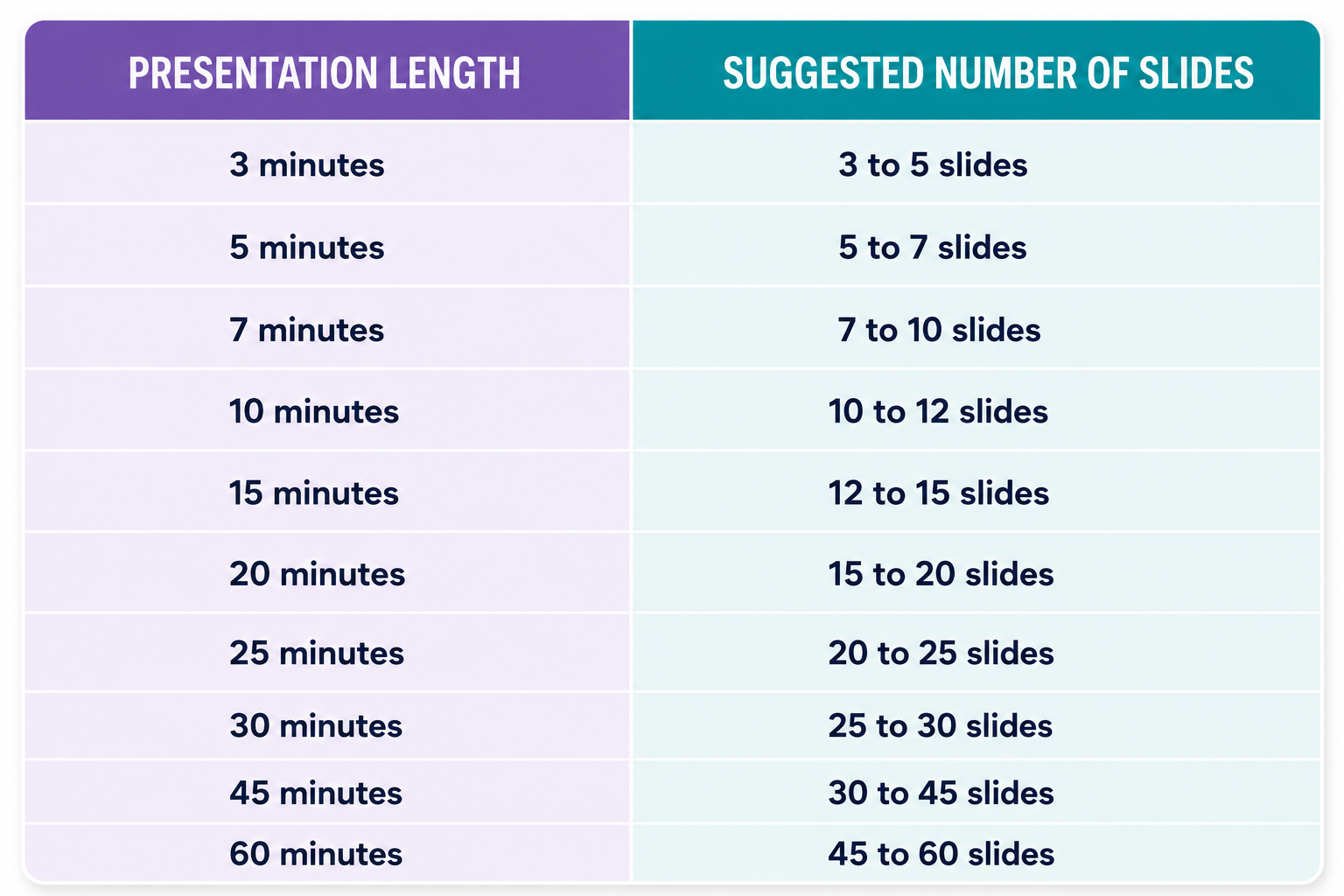
The right number also changes based on the presentation type. A business pitch may use fewer slides with more visuals. A lesson or workshop may require more slides to explain each topic step by step.
How Many Slides for a 3-Minute Presentation?
A 3-minute presentation usually needs 3 to 5 slides. You have very little time, so each slide should focus on one main idea. Avoid adding too much text. A simple structure works best:
• Slide 1: Introduction and main topic
• Slide 2: Key point or problem
• Slide 3: Main solution or information
• Slide 4: Supporting detail or example
• Slide 5: Closing message
This format works well for elevator pitches, quick updates, and short introductions.
How Many Slides for a 5-Minute Presentation?
A 5-minute presentation usually needs 5 to 7 slides. This length gives you enough time to explain your message without rushing. Each slide can stay on screen for around 45 to 60 seconds.
A simple outline may include:
• Title slide
• Topic overview
• Main points
• Data or examples
• Key takeaway
• Final slide
Keep your slides clean. Your voice should provide the details, not large blocks of text on the screen.
How Many Slides for a 7-Minute Presentation?
A 7-minute presentation usually needs 7 to 10 slides. This length allows you to add more examples and visuals. A good approach is to spend about 40 to 60 seconds on each slide.
You can include:
• Introduction
• Background information
• Three to five main points
• Examples or visuals
• Final message
A 7-minute presentation is common for school talks, team updates, and short business presentations.
How Many Slides for a 10-Minute Presentation?
A 10-minute presentation usually needs 10 to 12 slides. This is one of the most common presentation lengths. It gives you enough time to explain a topic with a clear flow.
A possible slide structure:
• Title slide
• Agenda or overview
• Problem or topic introduction
• Main ideas
• Supporting information
• Examples
• Final thoughts
• Question slide
Use visuals to support your message. Charts, images, and diagrams can explain ideas faster than text.
How Many Slides for a 15-Minute Presentation?
A 15-minute presentation usually needs 12 to 15 slides. This length allows more room for explanations. You can spend about one minute on each slide and add extra time for important sections.
A 15-minute presentation may include:
• Introduction
• Background
• Main discussion points
• Case studies or examples
• Data
• Summary points
• Closing slide
Avoid adding slides just to increase the count. Every slide should help the audience understand your message.
How Many Slides for a 20-Minute Presentation?
A 20-minute presentation usually needs 15 to 20 slides. At this length, your presentation can include more details. The audience has more time to follow your ideas.
A useful structure includes:
• Opening slide
• Topic overview
• Several content sections
• Visual examples
• Data or research
• Main lessons
• Closing message
Break longer sections into smaller parts. This helps keep the presentation easy to follow.
How Many Slides for a 25-Minute Presentation?
A 25-minute presentation usually needs 20 to 25 slides. This format works well for workshops, reports, and detailed explanations. Each slide should have a clear purpose.
You may include:
• Introduction
• Background information
• Multiple topic sections
• Examples
• Charts or graphs
• Key points
• Final discussion
Use a mix of content and visuals. Too many text-heavy slides can make a longer presentation feel difficult to follow.
How Many Slides for a 30-Minute Presentation?
A 30-minute presentation usually needs 25 to 30 slides. A longer presentation needs careful pacing. Spending too much time on early slides can make the ending feel rushed.
A 30-minute presentation often includes:
• Introduction
• Main sections
• Supporting examples
• Audience questions
• Data or demonstrations
• Closing points
Plan your timing before creating slides. This helps you give enough attention to each topic.
How Many Slides for a 45-Minute Presentation?
A 45-minute presentation usually needs 30 to 45 slides. This length is common for training sessions, lectures, and detailed business presentations. Some slides may stay on screen longer, especially those with charts, activities, or discussions.
A good structure may include:
• Opening section
• Topic explanation
• Multiple content areas
• Examples
• Interactive moments
• Final review
Do not rush through slides just to match a number. A clear message matters more than slide count.
How Many Slides for a 60-Minute Presentation?
A 60-minute presentation usually needs 45 to 60 slides. A one-hour presentation gives you time to explain complex topics, answer questions, and include activities.
A typical structure may contain:
• Introduction
• Several main sections
• Detailed examples
• Visual explanations
• Questions and answers
• Final points
Long presentations need variety. Use different slide formats to keep the audience focused. Mix text, visuals, charts, and discussion points based on your topic. The best slide count is the one that supports your message. A presentation with fewer clear slides often works better than one filled with unnecessary pages.
Recommended Slide Count by Presentation Type
The number of slides in a presentation depends on the topic, audience, and purpose. A business meeting needs a different slide count than a classroom lesson or a conference talk. A simple presentation may need only a few slides. A detailed session may need more slides to explain ideas, show data, or guide the audience through a process. The slide count below gives a practical range for common presentation types.
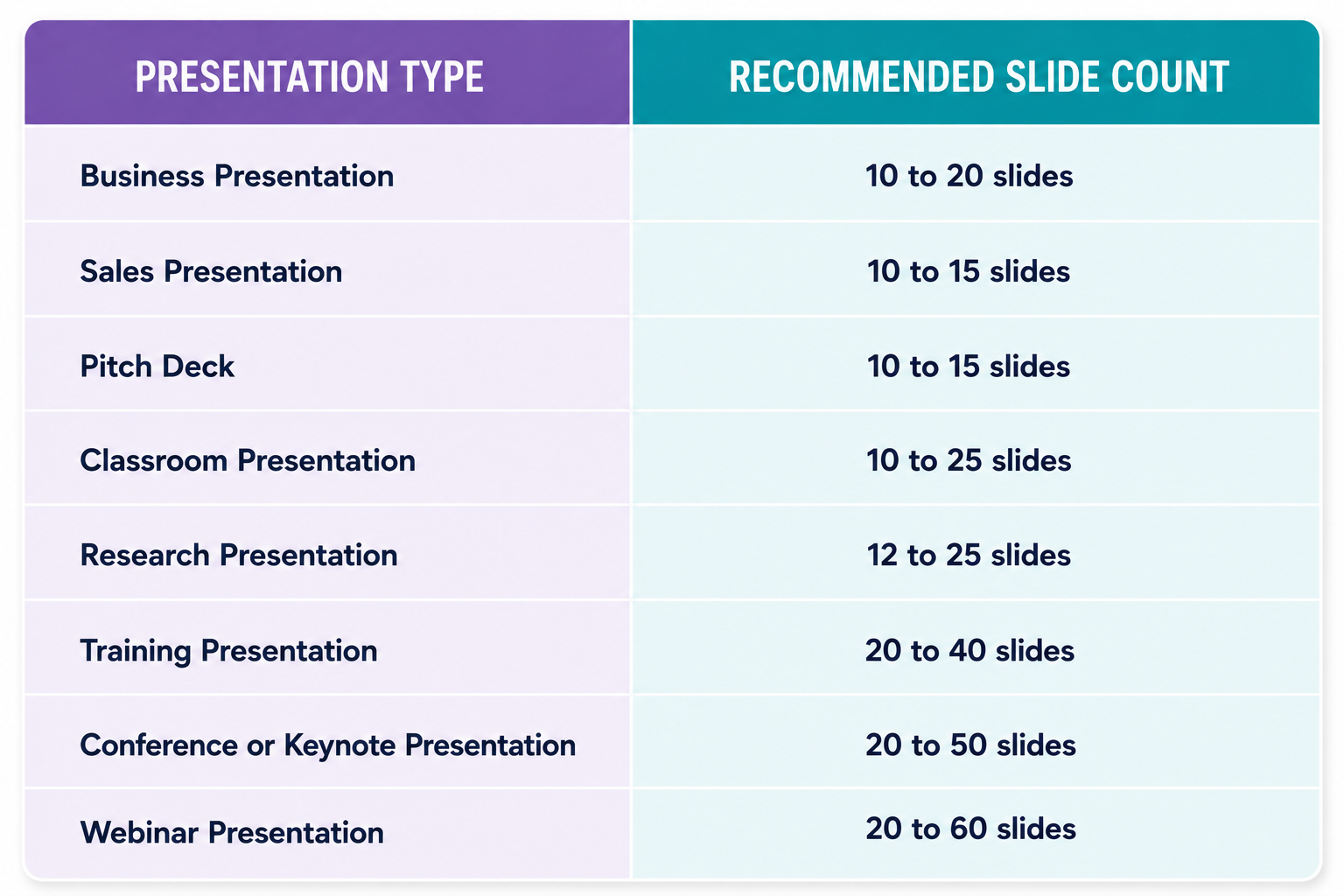
These numbers are starting points. The final number should match the amount of information you need to share and the time available for speaking.
Business Presentation
A business presentation usually needs 10 to 20 slides. Business presentations often cover plans, reports, strategies, or company updates. Each slide should support one main idea and help the audience follow the discussion.
A common structure includes:
- Title slide
- Agenda or overview
- Current situation
- Key challenges
- Data or insights
- Proposed ideas
- Supporting details
- Results or expected outcomes
- Action plan
- Closing message
Short meetings may use fewer slides. Detailed reports may require more slides for charts, numbers, and examples.
Sales Presentation
A sales presentation usually needs 10 to 15 slides. The goal of a sales deck is to explain a problem, present a solution, and show why the offer fits the customer's needs.
A typical sales presentation may include:
- Introduction
- Customer problem
- Market need
- Product or service overview
- Key features
- Benefits
- Customer examples
- Pricing details
- Next steps
Sales slides should focus on clear messages. Too much information can make it harder for the audience to understand the offer.
Pitch Deck
A pitch deck usually needs 10 to 15 slides. Pitch decks are common for startups, new projects, and business ideas. Each slide should answer an important question about the idea.
A standard pitch deck may include:
- Company introduction
- Problem
- Solution
- Product or service
- Target audience
- Market information
- Business model
- Growth plan
- Team
- Funding request
A short pitch often works better with fewer slides. Each slide should help tell a clear story.
Classroom Presentation
A classroom presentation usually needs 10 to 25 slides. The number depends on the subject and the class time. A short student presentation may need fewer slides. A lesson with many examples may need more.
A basic classroom structure can include:
- Topic introduction
- Main concepts
- Examples
- Visual explanations
- Supporting facts
- Key points
- Questions
- Final review
Students should avoid placing full paragraphs on slides. Slides should support the speaker, not replace the speech.
Research Presentation
A research presentation usually needs 12 to 25 slides. Research talks often include background details, methods, findings, and analysis. Each section needs enough space to explain the work clearly.
A common research presentation structure includes:
- Title
- Research question
- Background
- Previous findings
- Research method
- Data collection
- Results
- Charts or tables
- Analysis
- Main findings
- Future areas of study
- Closing points
The number of slides may change based on the research topic and presentation time.
Training Presentation
A training presentation usually needs 20 to 40 slides.
Training sessions often require step-by-step explanations, examples, and activities. More slides can help divide information into smaller sections.
A training deck may include:
- Training goals
- Topic introduction
- Main lessons
- Examples
- Demonstrations
- Practice activities
- Questions
- Review slides
- Final assessment
Each slide should focus on one learning point. This helps participants follow the lesson more easily.
Conference or Keynote Presentation
A conference or keynote presentation usually needs 20 to 50 slides.
These presentations often depend more on visuals than text. Speakers may use images, charts, and short statements to support their message.
A typical structure includes:
- Opening idea
- Topic background
- Main story
- Supporting examples
- Important data
- Audience insights
- Key lessons
- Final message
Some keynote speakers use many simple slides because each slide supports a small part of the speech.
Webinar Presentation
A webinar presentation usually needs 20 to 60 slides. Online presentations often use more slides because viewers need regular visual changes to stay focused. The slide count also depends on the length of the webinar.
A webinar deck may include:
- Welcome slide
- Speaker introduction
- Topic overview
- Main lessons
- Examples
- Screen demonstrations
- Questions
- Resources
- Final steps
Long webinars may include more slides with short points. Short webinars may work well with a smaller deck. The right number of slides is not only about quantity. Each slide should have a clear role and help move the presentation forward. A focused deck creates a better experience for both the presenter and the audience.
How Many Slides Per Minute Is Best?
A common question among presenters is how many slides they should show during a presentation. A good starting point is to match your slide count with your speaking time. The right number depends on your topic, audience, and presentation style. Many presentations work well with around one slide per minute. This gives enough time to explain the main points without rushing through the content. However, this rule is not fixed. Some presentations need more visual changes, while others need fewer slides with more explanation.
The One-Slide-Per-Minute Rule
The one-slide-per-minute rule is a simple way to plan your presentation length. For a 10-minute presentation, you can start with around 10 slides. For a 30-minute talk, around 30 slides can be a useful starting point. This approach helps keep your presentation balanced. Each slide gets enough time for the audience to read key points and follow your explanation.
The rule works best for presentations that include:
• Business updates
• Educational talks
• Training sessions
• Project presentations
A slide should support your message, not replace your speech. Use each slide to show key ideas, visuals, charts, or examples. Your explanation should provide the details.
When You Need More Slides
Some presentations need more than one slide per minute. This often happens with visual presentations where each slide shows a single idea. For example, a photo-based presentation may change slides every few seconds. A product showcase may use many slides to highlight different features. A storytelling presentation may also need frequent slide changes to keep the audience engaged.
More slides can help with:
• Showing step-by-step processes
• Presenting data points one at a time
• Creating visual stories
• Breaking down complex topics
Using more slides does not mean adding more text. Each slide should have a clear purpose. Too much information on one slide can make it harder for people to follow.
When Fewer Slides Work Better
Some presentations are stronger with fewer slides. This approach works well for topics that need deeper discussion and explanation.
A speaker giving a detailed report may spend several minutes on one slide. A research presentation may use fewer slides because each section needs more time for analysis.
Fewer slides work well for:
• Executive presentations
• Detailed reports
• Strategy discussions
• Long-form explanations
A smaller slide count can help the audience focus on the speaker instead of constantly reading new information. The key is making sure every slide adds value to the presentation.
The best slide count depends on your message and delivery style. Start with the one-slide-per-minute rule, then adjust based on the amount of detail each topic needs. A well-planned presentation gives every slide a clear role.
Does the 10/20/30 Rule Still Work?
Many presenters look for a simple rule to decide the right number of slides. The 10/20/30 rule is one of the most popular methods. It gives a clear structure for creating short and focused presentations. The rule can help in many situations, but it is not a fixed formula for every presentation. The right number of slides depends on your topic, audience, and presentation goal.
What Is the 10/20/30 Rule?
The 10/20/30 rule was introduced by Guy Kawasaki as a guide for creating better presentations.
The rule has three parts:
• 10 slides: Keep the presentation within 10 main slides.
• 20 minutes: Present the content within 20 minutes.
• 30-point font: Use text that is at least 30 points in size.
The main idea is to keep slides simple. A presenter should focus on key points instead of filling slides with too much text. This rule works well for business pitches, sales presentations, and short talks. It helps speakers stay focused and gives the audience enough time to follow the message.
Benefits
The 10/20/30 rule offers several advantages for presenters:
Keeps slides clear: A slide limit encourages you to remove extra information. Each slide has a clear purpose. The audience can follow the main message without getting lost.
Improves delivery: A shorter presentation gives you more control over your speaking time. You can explain ideas instead of reading text from the screen.
Creates better slide design: The 30-point font rule reduces text-heavy slides. It pushes presenters to use fewer words and rely more on visuals, charts, and simple points.
Helps with preparation: A set structure makes planning easier. You can organize your ideas before creating slides.
Limitations
The 10/20/30 rule is useful, but it does not fit every presentation.
Some topics need more slides: A training session, research presentation, or detailed report may need more than 10 slides. Removing important information just to follow the rule can hurt the presentation.
Time limits can change: Some presentations need 5 minutes. Others may require an hour or more. A 20-minute limit does not match every speaking situation.
Font size depends on design: A large font can improve readability, but some slides may need smaller text for data tables, charts, or references. The goal is clear communication, not following one number.
When to Follow It
The 10/20/30 rule works best for short presentations with a clear message. It is a good choice for:
• Startup pitches
• Sales meetings
• Client presentations
• Quick business updates
• Conference talks with limited time
It may not be the best choice for educational sessions, workshops, or presentations that require detailed explanations. Use the rule as a starting point, not a strict requirement. A strong presentation focuses on the audience, the message, and the time available. The number of slides should support your story, not control it.
Slide Count Recommendations at a Glance
The right number of slides depends on your presentation time, topic, and speaking style. A short presentation may need fewer slides. A longer presentation may need more slides to explain each point clearly. A good slide count gives you enough space to explain your ideas without rushing. Each slide should support your message. It should not replace your speech. Use your slides as a guide. Leave enough time to explain key points, share examples, and connect with your audience. A balanced slide count helps your presentation feel clear and organized.
Signs You Have Too Many Slides
A large number of slides can create problems during a presentation. Your slides may start to compete with your message. Watch for these signs that your presentation has more slides than needed.
You Rush Through Content
A packed slide deck can force you to speak too quickly. You may skip details or move from one slide to the next without enough explanation. Each slide needs enough time for your audience to follow along. A smaller slide count often gives you more room to explain your ideas.
You Skip Slides
Skipping slides during a presentation is a sign that your deck may have extra content. It can also make your presentation feel less organized. Review your slides and remove points that do not support your main message. Keep only the slides that help tell your story.
Slides Contain Too Much Text
Too much text can make slides hard to read. Your audience may spend more time reading than listening to you. Keep your slides simple. Use short points, clear headings, and only the details needed to support your message.
The Audience Loses Interest
A long slide deck can make it harder to keep your audience focused. Too many slides may slow the flow of your presentation. A strong presentation keeps each slide useful. Remove repeated ideas and focus on the information your audience needs most.
Signs You Have Too Few Slides
A presentation with too few slides can make your message harder to follow. Each slide should support your ideas and help the audience stay focused. A small number of slides is not always a problem, but crowded slides can reduce clarity.
Long Sections Without Visuals
A presentation may feel slow if several minutes pass without a new slide or visual change. The audience has fewer points to follow, and key ideas may lose their impact. Slides do not need to change every few seconds. The goal is to add a new slide at the right moment to support the speaker’s message. Charts, images, examples, and simple graphics can help break long sections into clear parts.
Too Much Information on Each Slide
Too few slides often lead to crowded layouts. A single slide may contain too many points, paragraphs, or details. Large blocks of text make it harder for people to read and listen at the same time. A better approach is to split heavy content across multiple slides. Each slide should focus on one main idea.
This creates more space and helps the audience follow the presentation step by step.
Weak Story Flow
A limited number of slides can make the presentation feel disconnected. Important ideas may appear too quickly without enough space to explain them. A good slide sequence creates a clear path from one point to the next. Each slide should have a purpose. It should help answer a question, explain a concept, or move the message forward. Adding more slides does not mean adding more content. It means giving each idea enough room to be clear.
Tips for Choosing the Right Number of Slides
The right number of slides depends on your message, time, and audience. A short presentation may need only a few slides, while a detailed topic may need more. The goal is to create slides that support your talk without making the audience read too much. A clear plan helps you decide how many slides you need. These tips can help you create a balanced presentation.
Start With Your Time Limit
Your presentation time gives you a starting point for slide planning. A 5-minute presentation usually needs fewer slides than a 30-minute session. A common approach is to spend about 1 to 2 minutes on each slide. This gives you enough time to explain your points without rushing. Adjust the number based on your speaking style and the amount of detail you need.
Plan Your Story First
Create your presentation structure before designing slides. Start with the main message, then add the key points that support it. A good structure often includes an opening, a few main sections, and a closing slide. This helps you remove slides that do not add value and keeps your presentation focused.
Keep One Idea Per Slide
Each slide should focus on one main idea. This makes your message easier to follow. Avoid adding too many points on a single slide. A crowded slide can distract your audience from what you are saying. Use simple text, visuals, or charts to explain your idea clearly.
Use Backup Slides
Some presentations need extra slides for questions or deeper details. Backup slides can include extra data, examples, or explanations that you may not show during the main presentation. These slides help you answer questions without making your main deck too long.
Rehearse and Adjust
Practice your presentation before the final version. Your practice session can show if you have too many or too few slides. Remove slides that slow down your message. Add slides if important points need more explanation. The final slide count should match your speaking time and presentation goals.
Common Slide Count Mistakes
Choosing the right number of slides helps your presentation stay clear and easy to follow. Many speakers make slide count mistakes that affect the flow of their message. A few extra slides or too much content can make it harder for the audience to stay focused.
Copying Someone Else's Slide Count
Every presentation has a different goal. A 20-slide presentation may work well for one speaker but feel too long for another. Copying someone else's slide count does not always fit your topic, audience, or speaking style. A sales pitch, classroom lesson, and team update all need different slide amounts. Focus on the information you need to share instead of matching another person's slide number.
Adding Slides Without Purpose
Each slide should have a clear reason to exist. Adding slides just to reach a certain number can make your presentation feel longer without adding value. A good slide supports your main message. Remove slides that repeat the same idea or add little information. Fewer slides with strong points often create a better experience for the audience.
Ignoring Speaking Speed
Your speaking speed affects how many slides you can cover. A speaker who talks slowly may need more time for each slide. A speaker who moves quickly may cover more slides in the same time. Many presenters create too many slides because they only focus on the content. They forget to leave enough time to explain ideas, answer questions, or connect with the audience.
Overloading Each Slide
A crowded slide can make your message harder to understand. Too much text, too many charts, or too many images can distract people from your main point. Keep each slide focused on one key idea. Use short text, clear visuals, and enough space between elements. A simple slide design helps your audience follow your message and remember the main points.
Final Notes
The right number of slides depends on your presentation time, topic, audience, and speaking style. There is no single slide count that works for every situation. A short talk may need only a few slides, while a longer session may need more space to explain ideas clearly. A good presentation uses slides to support the speaker. Each slide should have a clear purpose and focus on one main idea. Avoid adding extra slides just to increase the number. Every slide should help your audience understand the message.
A simple starting point is one slide per minute. This works well for many presentations, but it may change based on your content and delivery style. Some topics need more visual changes, while others need fewer slides with deeper explanations. Before presenting, review your slides and check if each one adds value. Remove repeated points, reduce unnecessary text, and make sure your audience can follow the flow easily. The best slide count is the one that helps you explain your ideas clearly within the available time. A focused presentation with useful slides will always be stronger than a large deck filled with extra information.
FAQs
How many slides should a 10-minute presentation have?
A 10-minute presentation usually needs around 10 to 12 slides. This gives enough time to explain each point without rushing. The final number depends on your topic, speaking style, and the amount of detail you need to share.
Is one slide per minute a good rule for presentations?
The one-slide-per-minute rule is a helpful starting point for planning. It works well for many business, education, and project presentations. Some presentations need more or fewer slides based on the topic and delivery style.
Can a presentation have too many slides?
Yes. Too many slides can make you rush through your content and give your audience less time to understand each point. Remove slides that repeat ideas or do not support your main message.
Can a presentation have too few slides?
Yes. A small number of slides can make a presentation harder to follow if each slide contains too much information. Adding more slides can help separate ideas and create a clearer flow.
How many slides should a 5-minute presentation have?
A 5-minute presentation usually needs 5 to 7 slides. Each slide should focus on one main idea and support your speech with clear points, visuals, or examples.
How many slides should a 30-minute presentation have?
A 30-minute presentation usually needs around 25 to 30 slides. The exact number depends on the topic, audience, and how much time you spend explaining each slide.
Does every presentation need a lot of slides?
No. A strong presentation does not depend on having many slides. A few well-designed slides can work better than a large deck with unnecessary details.
What is the 10/20/30 rule for presentations?
The 10/20/30 rule suggests using 10 slides, presenting within 20 minutes, and using 30-point font size. It is useful for short business presentations, but it may not fit every presentation type.
How do I know if I need more slides?
You may need more slides if your slides contain too much text, several ideas are mixed together, or important points need more explanation. Each slide should give enough space for one clear message.
How do I reduce the number of slides in my presentation?
Remove repeated information, combine similar points, and keep only slides that support your main goal. A clear structure helps you decide which slides are necessary.



You may also be interested in ...

Tips To Create A Great Infographic
Infographics Have been around for a while, but not many people know about them or are their preferred presentation choice. If...
08 Jun, 2024

3 Steps To Create The Best Presentation...
Presentations are something wonderful when well done, you can captivate an audience or be super interested in what another pe...
23 Jun, 2024

3 Tips For Your Next Presentation You MU...
PowerPoint presentations are perfect for explaining a topic and communicating your ideas with a visual aid. But most people s...
08 Jun, 2024