How to Use a Presentation Framework to Create Better Presentations
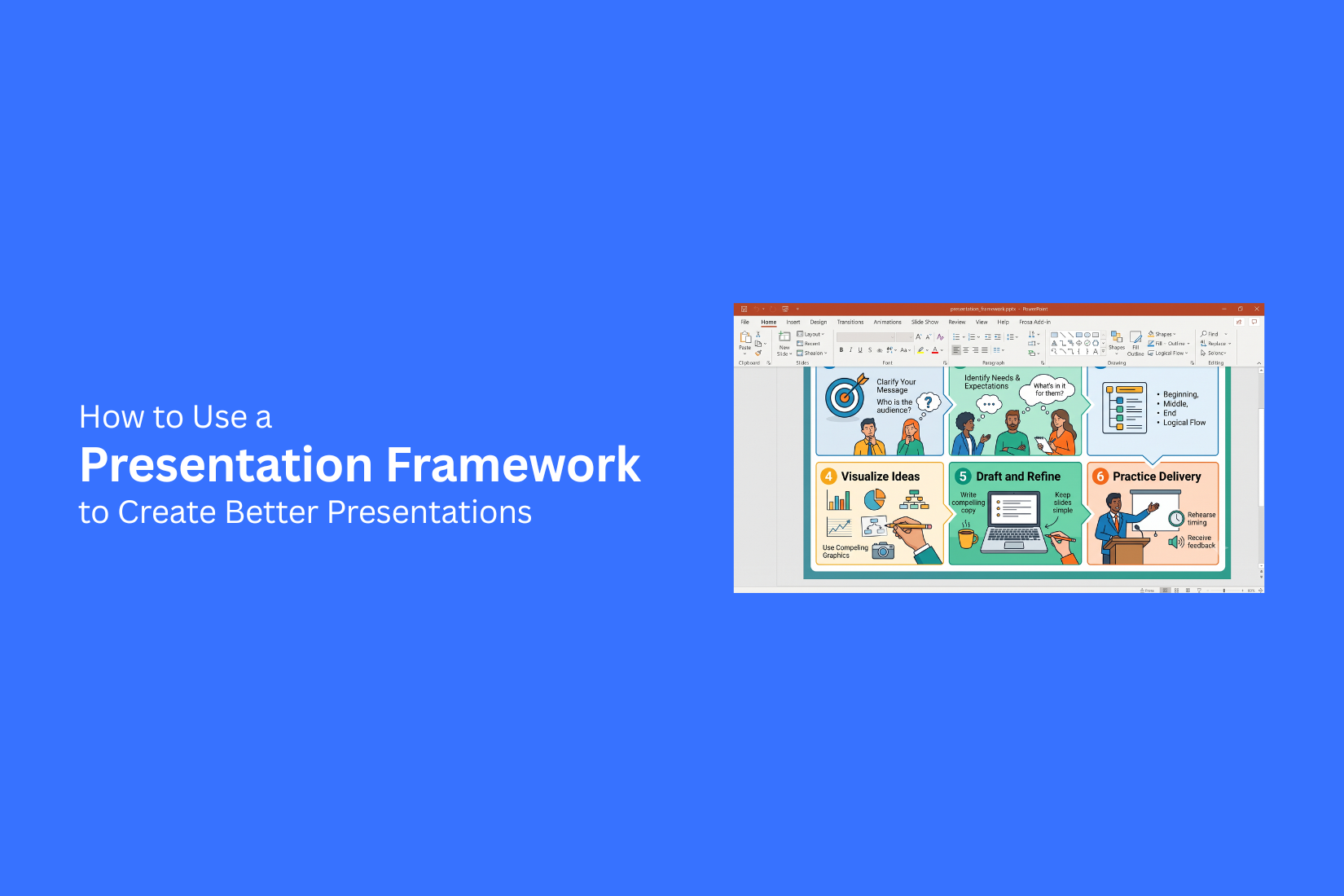
Creating a presentation without a clear structure can make your message hard to follow. Many slides may contain useful information, yet the audience may miss the main points. A weak plan can also make the creation process feel confusing and take more time.
A presentation framework helps solve this problem by giving your ideas a clear order. It guides you through planning goals, organizing content, and building slides that support your message. This guide explains how to use a presentation framework, why it matters, and the steps you can follow to create better presentations. You will also learn common frameworks and practices that help you build organized slides for different presentation goals and audiences.
What Is a Presentation Framework?
A presentation framework is a clear structure that helps you plan and organize your presentation. It works as a guide for arranging your ideas, choosing the right content, and building a logical flow from one slide to the next. Without a framework, a presentation can feel confusing. Key points may appear in the wrong order, and the audience may struggle to follow the message. A framework helps you decide what to include and what to leave out before you start designing slides.
A good presentation framework usually includes the main goal, audience needs, key points, supporting details, and a clear ending. It helps you create a presentation that feels organized and easy to understand. The framework does not limit your creativity. It gives your ideas a strong base so you can focus on creating slides that support your message. With a clear plan in place, you can spend more time improving your content, visuals, and delivery.
Understanding the Basics of a Presentation Framework
A presentation framework gives your ideas a clear structure before you start creating slides. It helps you organize your message, arrange information in the right order, and create a better flow for your audience. Instead of adding content randomly, you build each part with a clear purpose. A strong framework focuses on the message first. Design, images, and slide layouts come later. This approach helps you create presentations that are easier to follow and understand.
Definition of a Presentation Framework
A presentation framework is a planned structure that guides how you create and deliver a presentation. It works as a roadmap for your content. It helps you decide what to include, how to arrange your points, and how to connect each section. A framework usually starts with the main goal of the presentation. From there, you organize key messages, supporting details, and the final takeaway. This process helps keep your ideas focused and prevents unnecessary information from filling your slides. For example, a business presentation may start with a problem, explain the solution, show supporting details, and end with a clear next step. Each part has a role in helping the audience understand the message.
Key Elements of an Effective Presentation Framework
An effective presentation framework includes several key parts that shape the entire presentation.
Clear objective: Every presentation needs a main goal. The objective helps you decide what information belongs in the presentation and what should be removed.
Logical structure: A good framework places ideas in an order that feels natural. Each section should connect with the next part and help the audience follow the message.
Main points: The framework should include the most important ideas you want the audience to remember. These points create the foundation of your slides.
Supporting information: Facts, examples, charts, or stories can support your main points. They should help explain the message without making the slides crowded.
Strong ending: The final part of the framework should leave the audience with a clear message. It can include a summary of key points, a decision, or an action step.
These elements help you create a presentation with a clear direction. They also make the slide creation process easier because you already know what each section needs to communicate.
Difference Between a Presentation Framework and a Template
A presentation framework and a template serve different purposes. A framework focuses on the structure and flow of your ideas. A template focuses on the visual design of your slides.
A framework helps answer questions like:
• What is the main message?
• What points should come first?
• How should the story progress?
A template helps answer questions like:
• What should the slide layout look like?
• Which fonts and colors should be used?
• How should images and text be placed?
A template can make a presentation look polished, but it does not create a strong message on its own. A framework builds the foundation, while a template helps present that information in a clear visual format. Using both together creates a better process. You can plan your content with a framework and then use a template to design slides that match your message.
Why You Need a Presentation Framework
A presentation framework helps you arrange your thoughts before creating slides. It gives your message a clear direction and helps the audience follow your ideas. Without a framework, slides may feel disconnected, and key points can get lost. A strong framework works like a plan for your presentation. It helps you decide what information to include, how to arrange it, and how each slide supports the main message.
Organize Ideas With a Clear Structure
A presentation framework helps you put ideas in the right order. You can start with the main topic, add supporting points, and end with a clear takeaway. This structure keeps your slides focused. Each section has a purpose, so your audience can follow the message without confusion. It also helps you remove extra details that do not support your goal.
Make Complex Information Easier to Explain
Some topics include a lot of details, data, or steps. A framework helps break large ideas into smaller sections. You can group related points together and explain them one step at a time. This makes the content easier for your audience to understand and remember.
Create a Better Flow Between Slides
A good presentation should feel connected from one slide to the next. A framework helps create a smooth path for your ideas. Each slide can build on the previous one. The audience knows where the presentation is going and why each point matters.
Save Time During Presentation Planning
Creating slides without a plan often takes more time. You may spend hours changing layouts or moving information around. A presentation framework gives you a starting point. You can plan the structure first, then create slides with a clear purpose. This makes the planning process more organized and reduces unnecessary edits.
5 Steps to Use a Presentation Framework for Better Presentations
A presentation framework works as a plan for your slides and ideas. It helps you decide what to include, how to arrange your information, and how to guide your audience through your message. Without a clear framework, presentations can become difficult to follow. You may add too much information, miss key points, or create slides that do not match your goal. A simple framework gives you a step-by-step process. It helps you build presentations with a clear purpose and strong flow. The following five steps can help you create better presentations.
Step 1: Define Your Presentation Goal
Before creating slides, decide what you want your presentation to achieve. A clear goal gives your presentation direction and helps you focus on the right information. Start by identifying the main reason behind your presentation. Are you trying to explain an idea, share research, teach a topic, present a plan, or convince people to take action? Your goal should be simple and specific. A vague goal can make your slides confusing because you may include information that does not support your message.
For example, a business presentation may aim to explain a new strategy. A classroom presentation may aim to help students understand a topic. A project update may aim to show progress and next steps. Write down your main goal before designing your slides. Use it as a guide throughout the creation process. Each slide should help move your audience closer to that goal. A clear goal also helps you decide what to remove. Not every detail needs a place in your presentation. Focus on information that helps explain your main idea.
Step 2: Understand Your Audience
A good presentation starts with knowing your audience. People have different levels of knowledge, needs, and expectations. Your message should match the people listening to you.
Start by asking a few questions:
• Who will see this presentation?
• What do they already know about the topic?
• What information do they need?
• What questions may they have?
These answers help you choose the right words, examples, and level of detail. A presentation for company leaders may focus on results, costs, and plans. A presentation for new employees may need more background information and explanations. The same topic can need different approaches based on the audience. A technical subject may require simple examples for beginners. Experts may need more data and details. Understanding your audience also helps you choose the right presentation style. You can create slides that feel more relevant and easier to follow.
Step 3: Build a Strong Presentation Structure
A clear structure helps your audience understand your message from start to finish. It organizes your ideas and creates a natural order for your information. Start by creating a basic outline before designing slides. List your main points and arrange them in a way that makes sense.
A simple presentation structure can include:
• Opening: Introduce the topic, explain the purpose, and set expectations.
• Main section: Share your key points with examples, facts, or supporting details.
• Closing section: Repeat the main message and explain what your audience should take away.
Each part of your presentation should connect with the next one. Avoid jumping between unrelated ideas because it can make your audience lose track of the message. You can also group similar information together. This helps your slides feel organized and prevents unnecessary repetition. A strong structure saves time during the design process. It gives you a clear plan before you start adding visuals, text, and other slide elements.
Step 4: Design Slides That Support Your Message
Your slides should make your message easier to understand. They should support your presentation, not compete with your spoken words. Start with a simple layout. Give each slide one main purpose. A slide with too many ideas can make it hard for your audience to know where to focus. Use short text, clear headings, and helpful visuals. Charts can explain data. Images can support examples. Diagrams can show how different parts connect.
Pay attention to spacing and readability. Small text, crowded layouts, and too many design elements can reduce clarity. A good slide design keeps the focus on the message. Every element should have a reason for being there. Remove anything that does not help explain the topic. The visual style should also match the purpose of your presentation. A business report, training session, and creative pitch may need different design choices.
Step 5: Review and Improve Your Presentation
Reviewing your presentation helps you find problems before sharing it with your audience. Take time to check your slides, message, and overall flow.
Read through your presentation and ask:
• Is the main message clear?
• Does each slide support the goal?
• Is any information unnecessary?
• Are the slides easy to read?
Look for areas where your audience may have questions. Add explanations where needed and remove details that create confusion. Practice your presentation out loud. This helps you check the timing and see if your ideas connect well. You may notice parts that need better wording or a different slide order. Feedback can also help improve your presentation. Ask someone to review your slides and share their thoughts. A fresh view can help you find issues you may have missed. A final review turns a basic slide deck into a more organized presentation. It helps you deliver your message with more clarity and confidence.
Common Presentation Frameworks You Can Use
A presentation framework gives your ideas a clear order. It helps you decide what to share, how to arrange your slides, and how to guide your audience through your message. Different goals need different structures. A business pitch, a lesson, and a product update may all need a different approach.
Problem-Solution Framework
The Problem-Solution Framework starts with a challenge your audience understands. You explain the issue, show why it needs attention, and then present your solution. This structure works well for sales presentations, business plans, and project proposals. It helps the audience see the problem first before learning about the answer.
A simple flow looks like this:
• Explain the problem
• Show the impact of the problem
• Present the solution
• Share the results or next steps
Storytelling Framework
The Storytelling Framework uses a clear story path to share ideas. It helps make information easier to follow by connecting facts with a simple narrative. A presentation using this structure often includes a beginning, a challenge, and a change. Each slide moves the audience from one point to the next. This approach works well for brand stories, case studies, and personal experiences. It gives your presentation a natural flow instead of a list of unrelated points.
Before-After-Bridge Framework
The Before-After-Bridge Framework shows a clear change from the current situation to a better outcome. The "Before" section explains the current problem or situation. The "After" section shows what success looks like. The "Bridge" section explains the steps needed to reach that goal. This structure is useful for product presentations, service pitches, and improvement plans.
Three-Act Presentation Structure
The Three-Act Presentation Structure follows a simple beginning, middle, and end format. The first part introduces the topic and sets the stage. The second part shares the main information, challenges, or solutions. The final part brings the message together and explains the next action. This structure helps keep longer presentations organized. It gives the audience a clear path through your ideas.
Data Storytelling Framework
The Data Storytelling Framework helps turn numbers into a clear message. Instead of showing data without context, this structure explains what the data means and why it matters.
A typical flow includes:
• Present the key data
• Explain the meaning behind the numbers
• Share the main takeaway
• Suggest the next step
This framework works well for reports, research presentations, and business reviews. It helps the audience understand the story behind the data.
Best Practices for Using a Presentation Framework
A presentation framework helps you organize ideas and create a clear flow. The right approach makes each slide easier to follow. These practices help you build presentations that share your message in a simple way.
Start With a Clear Main Message
Every presentation needs one main idea. This message guides your content and helps you decide what belongs on each slide. Start by writing your key point in one or two sentences. Use it as a guide while creating your slides. Remove details that do not support this message. A clear message helps your audience understand the purpose of your presentation from the beginning.
Keep Your Audience as the Focus
A good presentation is built around the needs of the audience. Your slides should answer their questions and provide useful information. Think about what your audience wants to learn. Use examples, data, and explanations that match their level of knowledge. A presentation becomes easier to follow when every slide has a reason to be there.
Use Visuals to Strengthen Ideas
Visual elements can make complex information easier to understand. Charts, images, icons, and diagrams can support your main points. Use visuals that match your message. Avoid adding images only for decoration. Each visual should help explain an idea or highlight key information. Simple visuals often create a stronger connection than slides filled with text.
Maintain Consistent Slide Design
A consistent design creates a smooth viewing experience. Use the same fonts, colors, layouts, and styles throughout your presentation. Keep your slide structure clear. Place titles, text, and visuals in a similar format across slides. A clean design helps your audience follow the content without distractions.
Test and Improve Your Presentation
Review your presentation before sharing it with others. Check if the message is clear and the slides flow well together. Practice presenting the slides out loud. This helps you find areas that need changes. Ask others for feedback and use their suggestions to make your presentation better. Small updates can improve the quality and clarity of your final presentation.
Common Mistakes to Avoid When Using a Presentation Framework
A presentation framework helps organize ideas and create a clear flow. However, the wrong approach can make a presentation less effective. Many problems happen before the slides are even designed. Knowing these mistakes helps you build a stronger structure and keep your message clear.
Choosing a Framework That Does Not Match Your Goal
Every presentation has a different purpose. A sales pitch, training session, and business report need different structures. Using a framework that does not fit the goal can make the message confusing. Start by defining what you want the audience to understand or do after the presentation. Pick a framework that supports that purpose. A good match helps each slide serve a clear role.
Adding Too Much Information to Slides
A framework helps organize content, but it does not mean every detail belongs on a slide. Too much text can make slides hard to read and distract the audience from the main idea. Focus on the key points that support your message. Use short text, visuals, and simple layouts. Extra details can be shared through speaker notes or during the presentation.
Creating Slides Before Planning the Structure
Starting with slide design may feel easier, but it often leads to a weak flow. Without a clear structure, slides may feel disconnected or repeat the same ideas. Plan the main sections first. Decide the order of your points and how each part connects. A strong structure gives you a clear path before you begin designing slides.
Ignoring Audience Expectations
A presentation should match the needs of the people watching it. A technical audience may need more details, while a general audience may need simpler explanations. Learn what your audience cares about before building the presentation. Use examples, language, and information that fit their needs. This helps keep their attention and makes the message easier to follow.
Forgetting the Main Purpose of the Presentation
A presentation can lose focus if the main goal is not clear. Adding extra topics or unrelated details can weaken the message. Keep the main purpose visible throughout the process. Check each section and slide to see if it supports your goal. A clear purpose helps create a presentation that delivers the right message.
Final Notes
A presentation framework helps you create slides with a clear purpose and structure. It gives your ideas a proper order and helps you focus on the message before working on design. With a framework, you can plan your content, organize your points, and create a better flow for your audience. The right framework depends on your presentation goal. A problem-solution structure works well for explaining challenges and answers. A storytelling structure helps share ideas through a connected flow. Data storytelling helps explain numbers with meaning. Choosing the right structure makes your presentation easier to follow.
A good presentation is built before the design stage begins. Start with your goal, understand your audience, arrange your ideas, and create slides that support your message. Review your work, practice your delivery, and make changes where needed. Using a presentation framework does not limit creativity. It gives your ideas a foundation and helps you create presentations that are organized, focused, and easier for your audience to understand.
FAQs
What is a presentation framework?
A presentation framework is a structure that helps you plan and organize your presentation. It guides the order of your ideas, key points, supporting details, and slide flow.
Why should I use a presentation framework?
A presentation framework helps you create a clear message and organize your content before designing slides. It can save planning time and make your presentation easier for the audience to follow.
What is the difference between a presentation framework and a template?
A presentation framework focuses on the structure and flow of your ideas. A template focuses on the visual design of your slides, such as layouts, fonts, and colors.
How do I choose the right presentation framework?
Choose a framework based on your presentation goal. A sales pitch may need a problem-solution structure, while a report may work better with a data storytelling framework.
Can a presentation framework help with slide design?
Yes. A framework helps you understand what each slide needs to communicate. This makes it easier to choose layouts, visuals, and text that support your message.
What are some common presentation frameworks?
Common frameworks include the Problem-Solution Framework, Storytelling Framework, Before-After-Bridge Framework, Three-Act Presentation Structure, and Data Storytelling Framework.
Should I create slides before planning my framework?
No. Start with your framework first. Planning your structure helps you create slides with a clear purpose and prevents a confusing slide order.
How can I improve a presentation after creating it?
Review your slides, check your main message, practice your presentation, and ask others for feedback. These steps help you find areas that need improvement.



You may also be interested in ...

How To Create An Eye-Catching Portfolio
If you’re looking to create an eye-catching portfolio, this post will come in handy. In this article, you can find the easies...
23 Jun, 2024

How To Easily Create An Infographic
Infographics are the perfect way to make a presentation that will impact an audience, but their design and composition might...
08 Jun, 2024

PowerPoint Template Tips & Tricks You Ne...
PowerPoint seems to be an unknown world for many people, especially those who have been assigned to create a presentation out...
08 Jun, 2024